Instructions for using telegram bots for cryptocurrency arbitrage in the direction exchange -> exchangers from the BestChange aggregator
The bot helps you find the best spread between buying and selling cryptocurrencies on the Binance, ByBit or Mexc exchange and exchangers from the BestChange aggregator without using bank cards.
100% faster than all competitors - we improved our algorithms until we achieved the best results
The most extensive functionality
The most effective, proven and time tested operating algorithm. The bot is available for users from July 9, 2022
The most complete information on exchangers, available in several options. We have collected more than 2,900 reviews of arbitrage traders on exchangers, sorted exchangers by category and update the information daily. Data is immediately visible in each arbitrage opportunity
We have the most extensive experience behind us and our users
We also independently work daily using arbitrage opportunities from the bot
We are not providing an advertised "toy" for "pushing buttons", but a truly proven tool
The bot has a monitoring function: if at the moment there is no arbitrage opportunity with the desired spread, then it will be able to monitor prices. As soon as the bot sees a link with the income you are interested in, it will send you a notification. The maximum number of monitoring is 10.
Our resources:
- Telegram channel: https://t.me/BigBTCchannel
- Our chat: https://t.me/BigBTCchat
- Our YouTube channel: https://www.youtube.com/c/BigBTC
- Bot for training: https://t.me/BigBTC_learning_bot
Bots for arbitrage of cryptocurrencies in the direction of exchange - exchangers from the BestChange aggregator are divided into different bots by exchange:
- Bot Binance - BestChange: https://t.me/cryptocurrency_arbitrage_bot
- Bot ByBit - BestChange: https://t.me/arbitrage_bybit_bot
- Bot Mexc - BestChange: https://t.me/arbitrage_mexc_bot
This is done for convenience: the links in the bots are approximately the same and appear at approximately the same time intervals. The bot algorithms are identical, the cost is the same. Based on the experience of us and our users, this option is preferable
It is not necessary to purchase a subscription to all bots at once; you can choose a bot with the exchange that is more convenient for you to work with, since the bot will show coin rates and information about networks specifically with the selected exchange, and links to the exchange will be generated specifically with the exchange you have chosen
At any time during the validity period of your subscription, you can transfer your subscription to a bot with another exchange
The principles of operation of bots with different exchanges are identical; for example, in the instructions we will analyze the bot with the Mexc exchange
What does an arbitrage opportunity include?Copy link
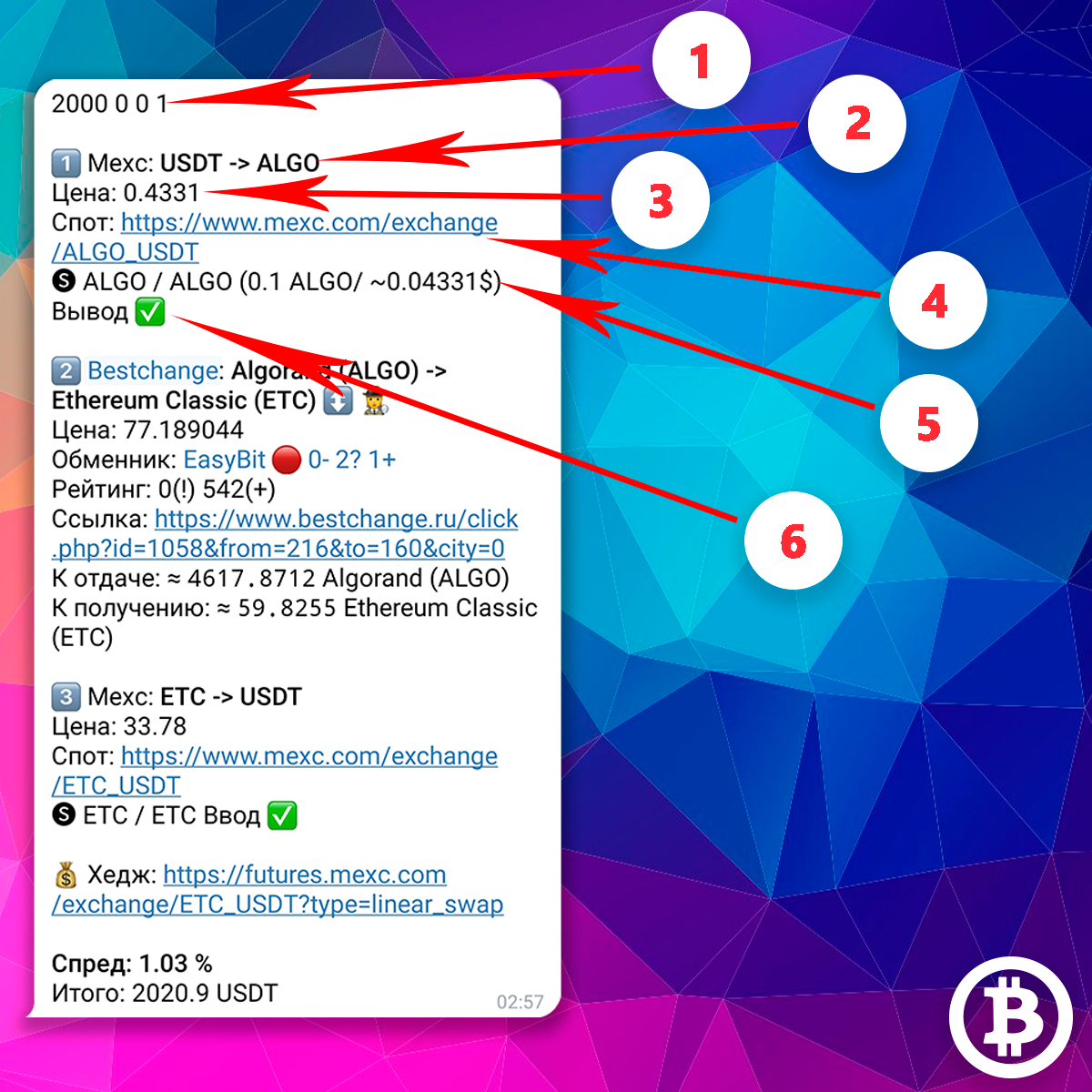
Here you see an example of a arbitrage opportunity. There are 3 types of arbitrage opportunities in total, more on that later. For greater clarity, the example shows a complex combination consisting of three stages. Blocks are marked with numbers and their description:
1Monitoring information
Information about the monitoring to which the arbitrage opportunity arrived
2Exchange and direction of exchange
The exchange on which the exchange must be made, and the direction of the exchange. In this case, we need to exchange the USDT coin for the ALGO coin on the Mexc exchange
3Exchange rate on the stock exchange
4Link to spot pair
Link to the spot pair to make an exchange on the exchange
5Network information for output
Information about the network used to withdraw coins from the exchange to the exchanger. Here you see the name of the network, in brackets the commission for withdrawing a coin in this network is indicated in coin and in USDT
6Information about withdrawal options
Information about the possibility of withdrawing coins from the exchange via the required network. The ✅ icon means that withdrawal is available, the ❌ icon means withdrawal is not available on the exchange.
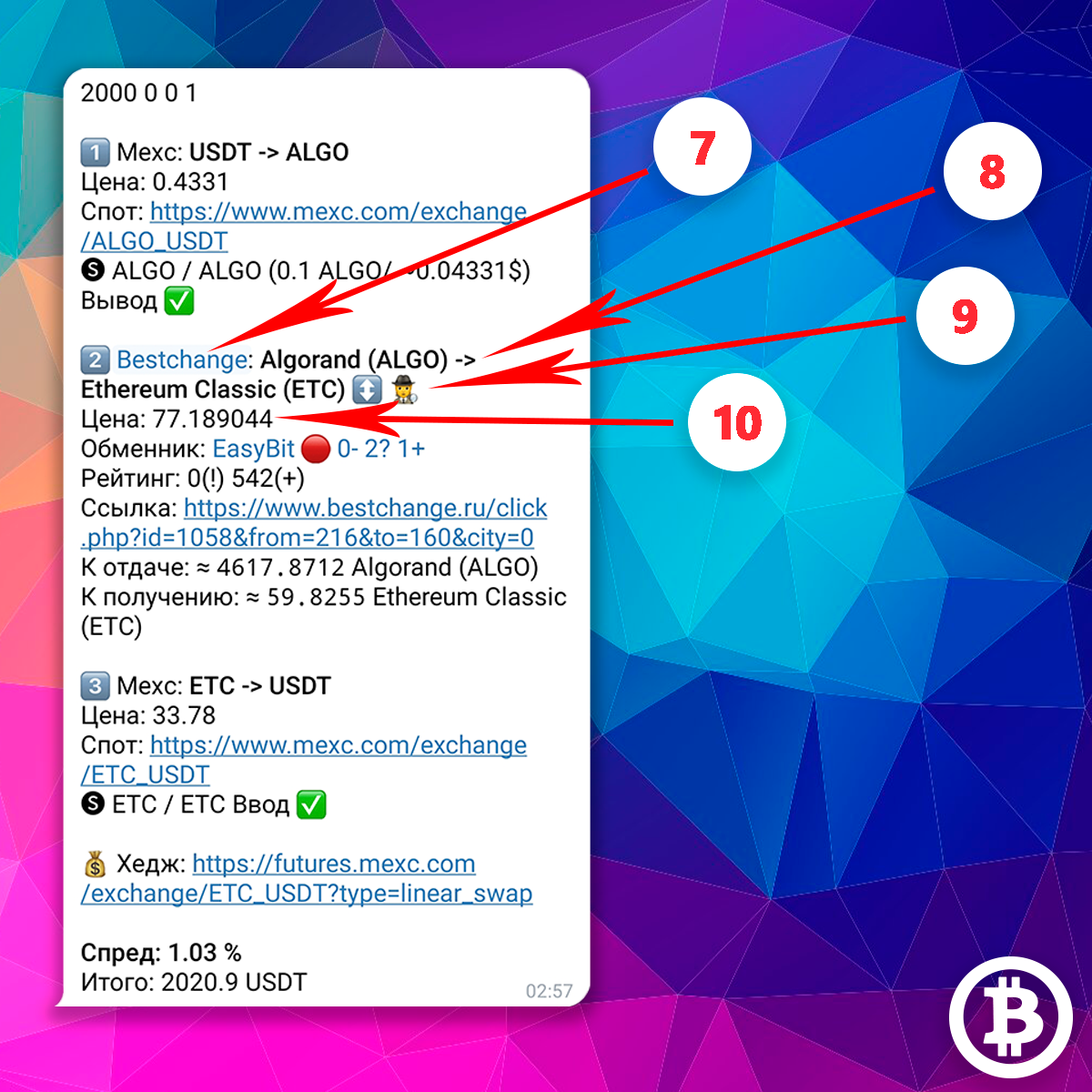
Let's move on to the second stage of the arbitrage opportunity
7Link to currency pair on BestChange
8Exchange direction on the exchanger from BestChange
In this case, we need to exchange the ALGO coin for an ETC coin at the exchanger
9Legend from BestChange
Symbols from BestChange for this exchange direction for a specific exchanger. In this case we see 2 symbols:
- The first ↕ - means that this exchange office for this exchange direction does not fix the exchange rate at the time of creating the application.
- The second 🕵 - means that this exchanger may request verification of client documents or suspend the exchange to verify other data.
You can see a reminder on the symbols of exchangers by clicking on the USL button. EXCHANGER DESIGNATIONS in your personal account
10Exchange rate on the exchanger
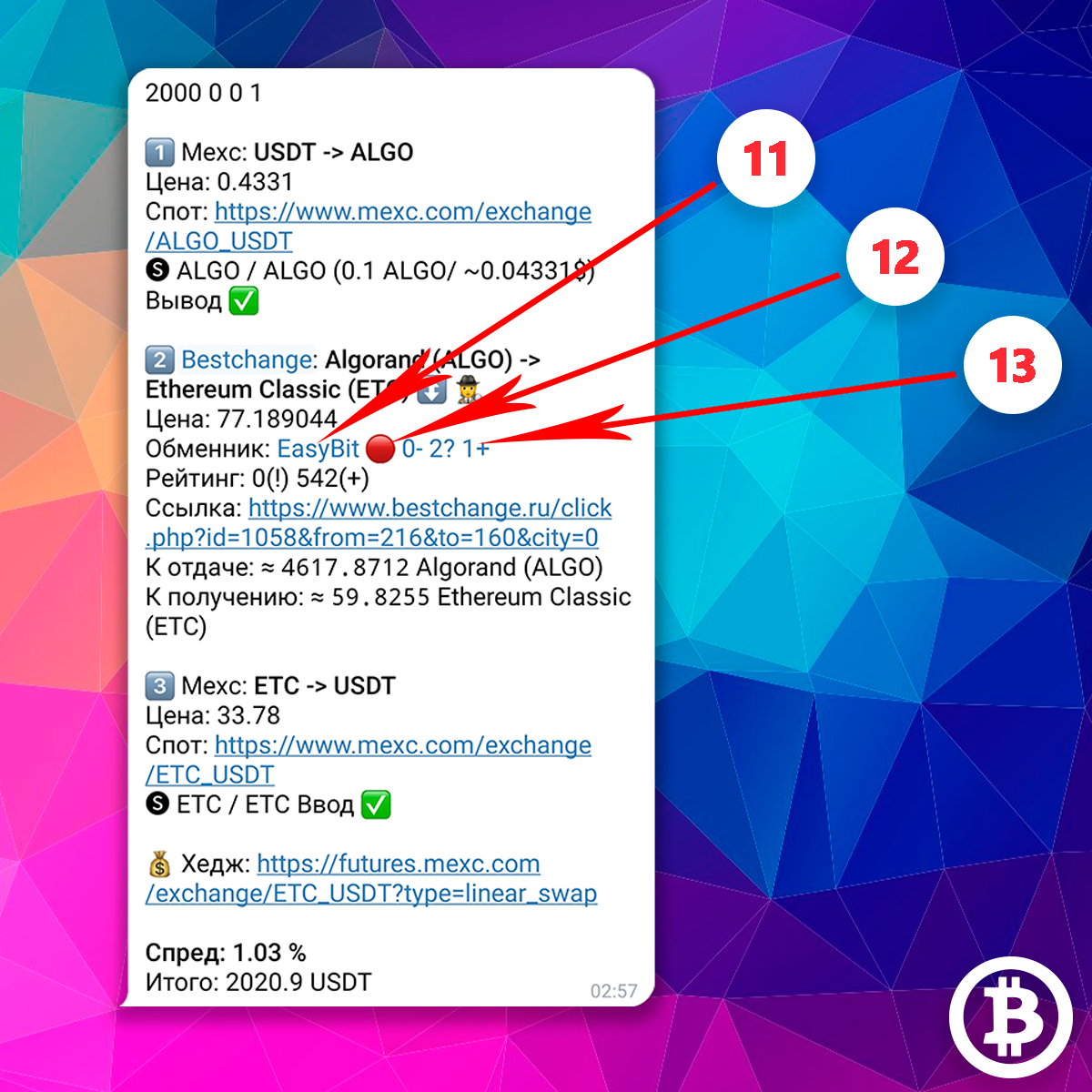
The exchanger column is information about the exchanger from our website.
Presented here:
11Link to the exchanger page on BestChange
12Exchanger category in the table of exchangers on our website
More details about the categories of exchangers can be found in the corresponding block. In this case, the exchanger belongs to the red category
13Number of reviews from the table of exchangers
The number of negative (-), neutral (?) and positive (+) reviews from users of our bots from the table of exchangers on our website. In this case, the exchanger has 0 negative reviews, 2 neutral, and 1 positive reviews in the table of exchangers
Click on the number of reviews and you will be taken to the exchanger page on our website. By clicking on this link, you will see the operating conditions of the exchanger and all reviews from users of our bots for a specific exchanger in chronological order. Negative user reviews will be marked in red, neutral ones (carrying any necessary information without rating) - yellow, positive - green.
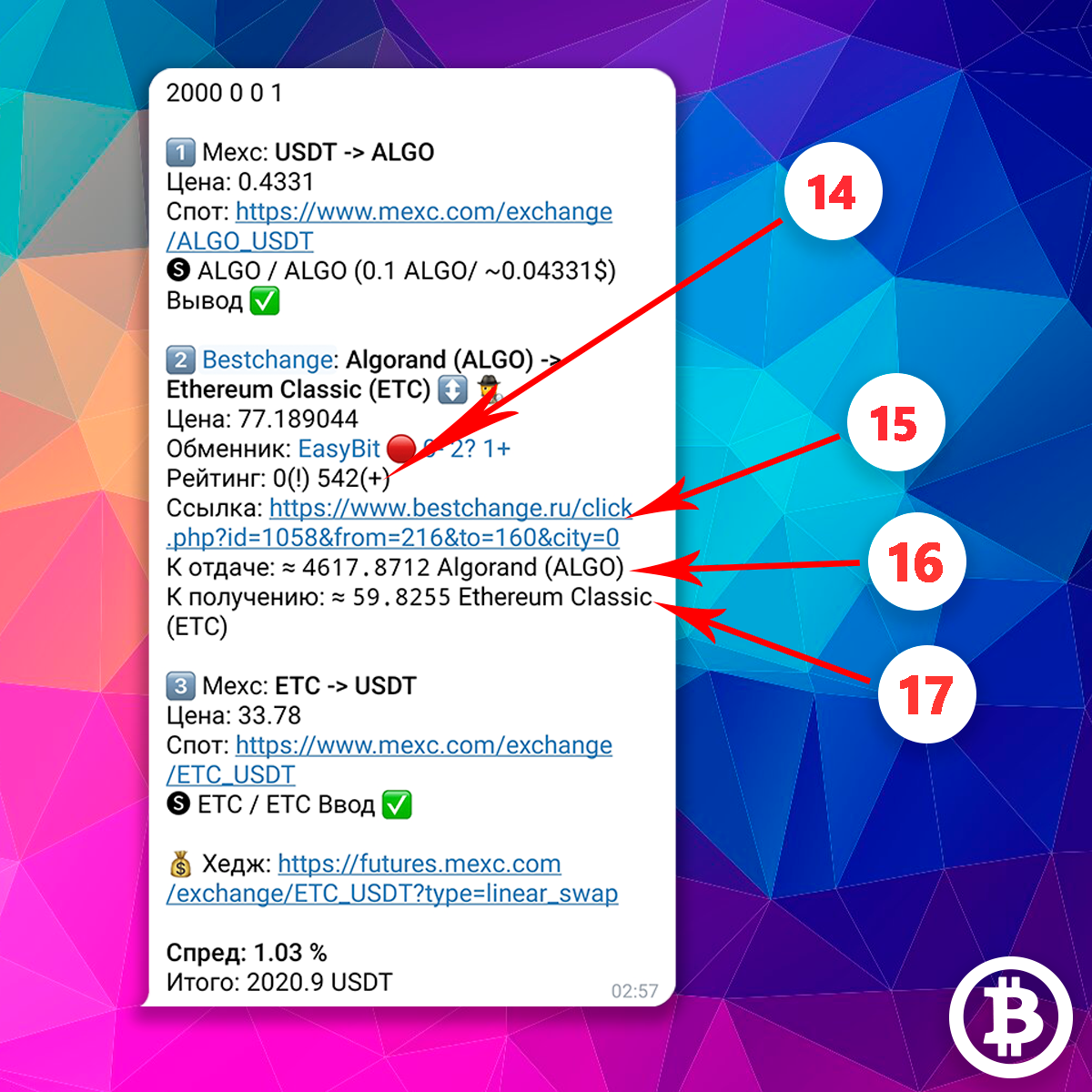
14Rating column
The rating column is the rating of the exchanger on BestChange. Here are the following:
- Under the sign (!) - The number of open claims for the exchanger on BestChange.
- Under the sign (+) - The number of positive reviews for the exchanger on BestChange.
15Link to the exchanger's website
This link takes you to the exchanger’s website with the desired exchange direction. Please note: the link works as a redirect through the BestChange website itself. This is done intentionally: the redirect helps you to be sure that the link leads to the actual, real exchanger site provided by the BestChange aggregator itself.
16The amount you need to send to the exchanger
17The approximate number of coins that you will receive from the exchanger after completing the exchange.
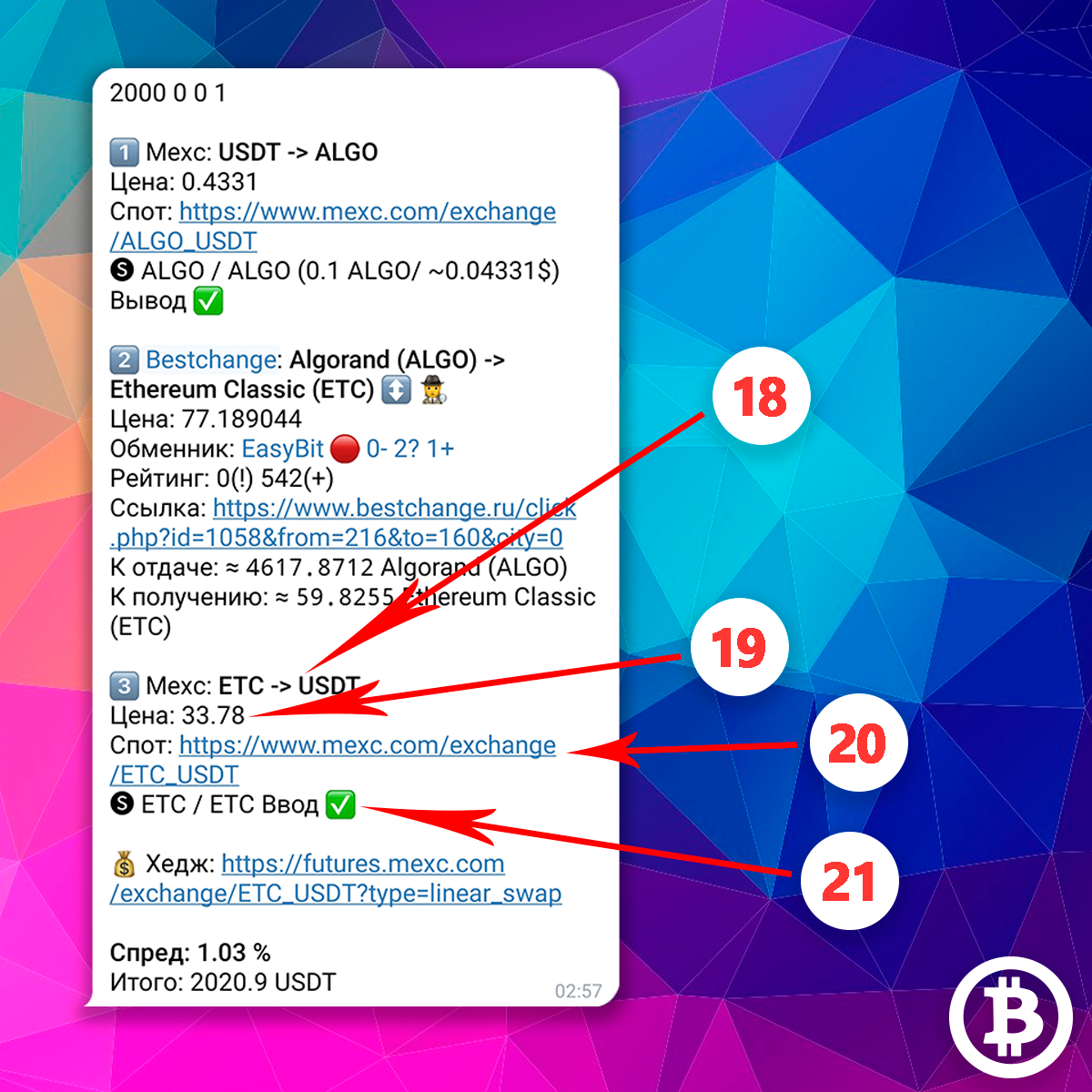
Let's move on to the third stage of the arbitrage opportunity
18Exchange direction
19Exchange rate on the stock exchange
20Link to spot pair for exchange
21Network information to enter
Information about the network used to transfer coins from the exchanger to the exchange. The ✅ icon means that coin input on the exchange is available, the ❌ icon means input on the exchange is not available.
22The final blocks of information in the arbitrage opportunity:
Hedge - link to the futures pair for hedging
Spread - income from the arbitrage opportunity as a percentage
Total - the total amount in USDT that should be in your hands as a result of working on the link
Personal accountCopy link
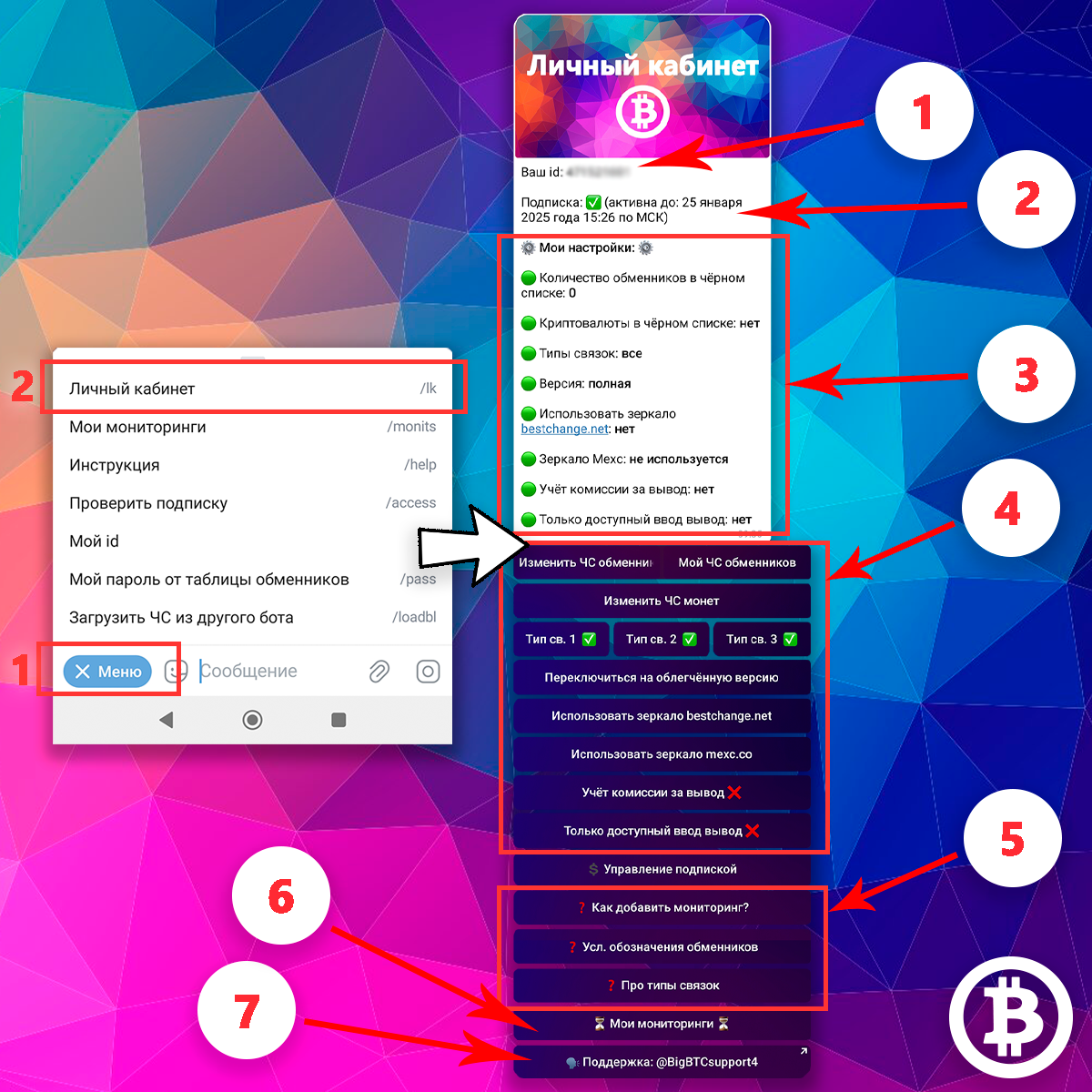
To get to your personal account, click the PERSONAL ACCOUNT button in the main menu of the bot
What is in your personal account:
1Your id is a unique identifier assigned to you by the bot
2Information about your subscription
3Information about all your current settings
4You can also change the bot settings through your personal account.
5Reminders
6Button for managing monitoring
7Button to contact support
What is an exchanger blacklist?Copy link
All exchangers from the BestChange aggregator are safe and verified, but not all exchangers from the BestChange aggregator are convenient for arbitration (at least if you follow our work tactics). You can add any exchanger to your personal black list of exchangers, and you will not see links with these exchangers in the bot’s results.
The black list of exchangers is those exchangers with which you do not want to work. For example, the exchanger does not fix the exchange rate, often makes refunds, etc. - add it to the blacklist, and you will no longer see it in the bot’s links.
The blacklist of exchangers is individual for each user. Everyone must decide for themselves which exchangers they want to work with and which they don’t, in accordance with their risk profile
What should be added to the exchanger blacklist?Copy link

About choosing exchangers:
Our activity is interaction with exchangers, so it is very important to know their features and operating rules.
There is no need to read reviews of exchangers on the BestChange website and read their operating conditions yourself. It will take too long. We have already structured all the information for you
Before you start, familiarize yourself with the table of exchangers. Open the table of exchangers on our website https://bigbtc.store/bestchange-exchangers-list (see below for how to access it). This table contains information on exchangers for the entire period of operation of our bots. Each information has been checked and entered into this table since the creation of bots for arbitrage with BestChange, and all reviews from users of our bots on exchangers are also collected there. There is no need to familiarize yourself with the information on the exchanger after you have received the arbitrage opportunity. You need to read it and fill out your black list of exchangers immediately
Currently we do not work with exchangers that do not fix the exchange rate. Therefore, if you adhere to our work tactics, immediately add all exchangers from the red category to your exchanger black list.
For all other exchangers, first focus on user reviews. If there are few reviews for an exchanger, it means that users have little experience with it. The more positive reviews the better, this means that a large number of users have already tested working with this exchanger and were able to earn money. Negative feedback is usually a return from the exchanger. That is, the exchanger refused to carry out the transaction and returned the money to the user, this is bad. It is risky to work with such exchangers: if you hedged the coin you received, and the exchanger returned the initial amount to you, you may have a minus on futures (maybe a plus)
Exchangers that fix the rate after the 1st network confirmation are for experienced users.
Exchangers from the green category are the best and easiest choice, but pay attention to user reviews on them.
There are exchangers that fix the exchange rate by pressing a certain button (information in the table of exchangers). Attention: if you do not select a fixed rate on them, the rate will not be fixed
Let us add on our own behalf: immediately add the exchanger Kursov24, Quickex, E-Scrooge, ExHub, Bitcoin24SU to the blacklist.
With Avanchange, ChangeHero and CoinShop24, be careful, do not forget that FixedFloat takes a commission for fixing the rate of approximately 1 percent
About the exchanger tableCopy link
All exchangers in the table of exchangers https://bigbtc.store/bestchange-exchangers-list are divided into 4 categories according to the exchange conditions. You see the same division by category and number of reviews immediately in the arbitrage opportunity that the bot sent you.
Green indicates exchangers that:
- fix the exchange rate immediately
- can fix the course by pressing a certain button,
- fix the rate, but with some reservations
Yellow exchangers that fix the rate are highlighted:
- after the first network confirmation/after several network confirmations,
- fix the rate depending on the direction of exchange,
- fix the rate, but if the rate changes by more than 0.5% (0.3%), the amount in the application may be changed
In red exchangers with a fully floating rate are highlighted.
Gray highlights exchangers that are not currently assigned to any category, but have reviews
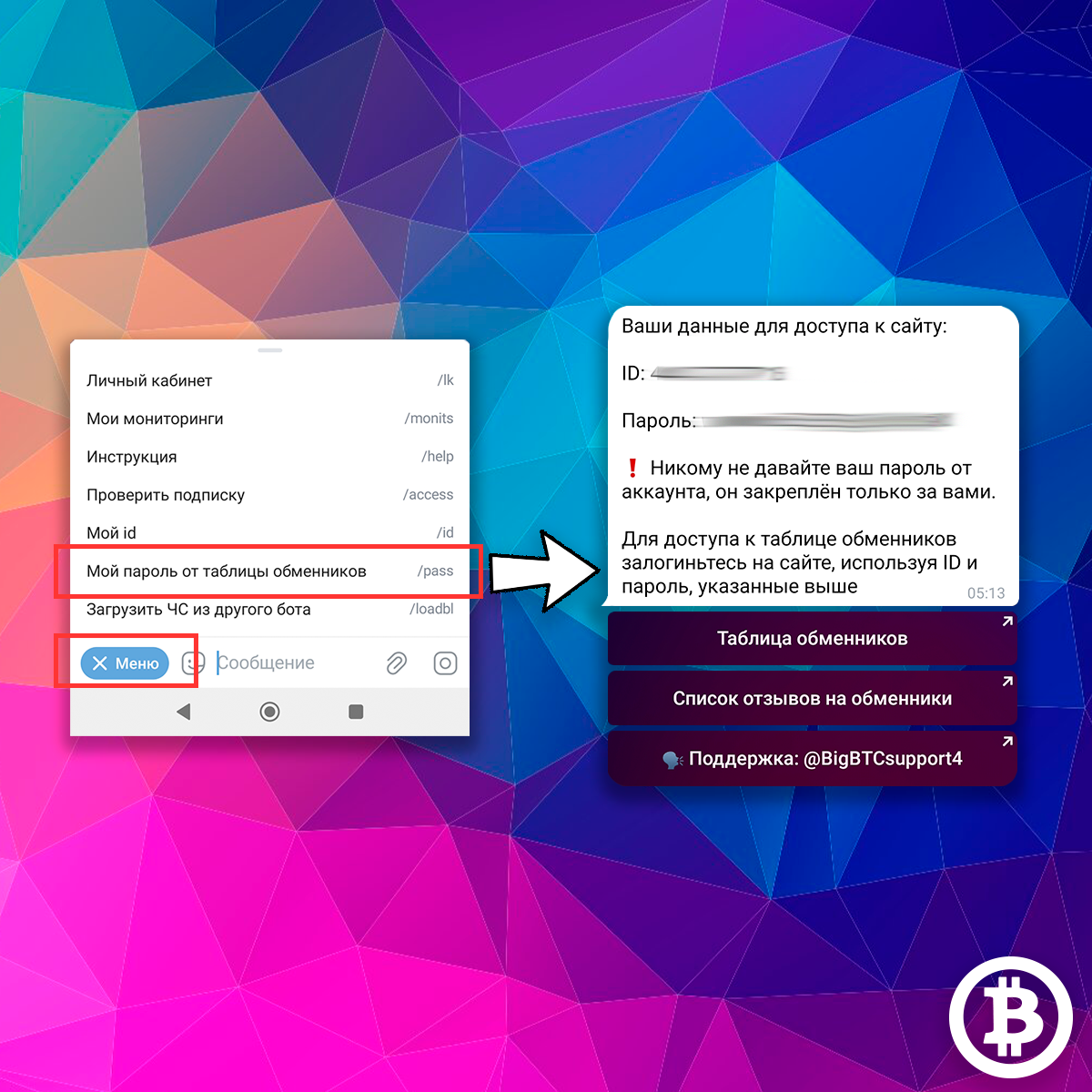
Only bot users with a valid subscription have access to the table of exchangers and the list of user reviews for exchangers from BestChange.
To see your login and password from the exchangers table, click on the MY PASSWORD FROM EXCHANGERS TABLE button in the main menu of the bot. In the message that appears from the bot, your login and password are clickable: they are copied with one click. In the same message you will see buttons links to the table of exchangers and a list of reviews of exchangers from BestChange
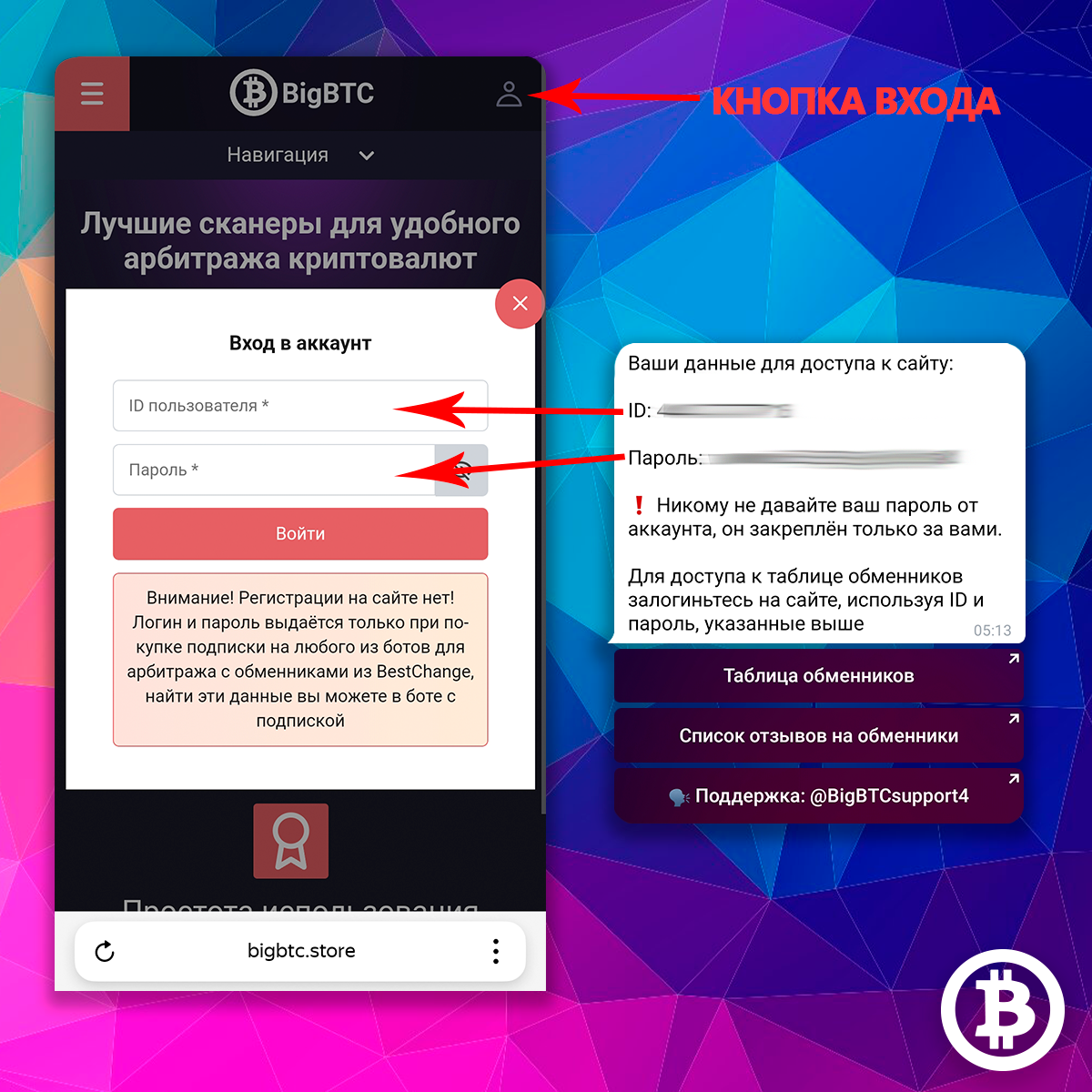
In order to access the table of exchangers and the list of reviews for exchangers from BestChange, you need to log in to our website
On any page of the site, click the login button in the upper right corner. In the window that appears, enter your username and password given to you by the bot, then click the LOGIN button. Done, you are logged in to the site.
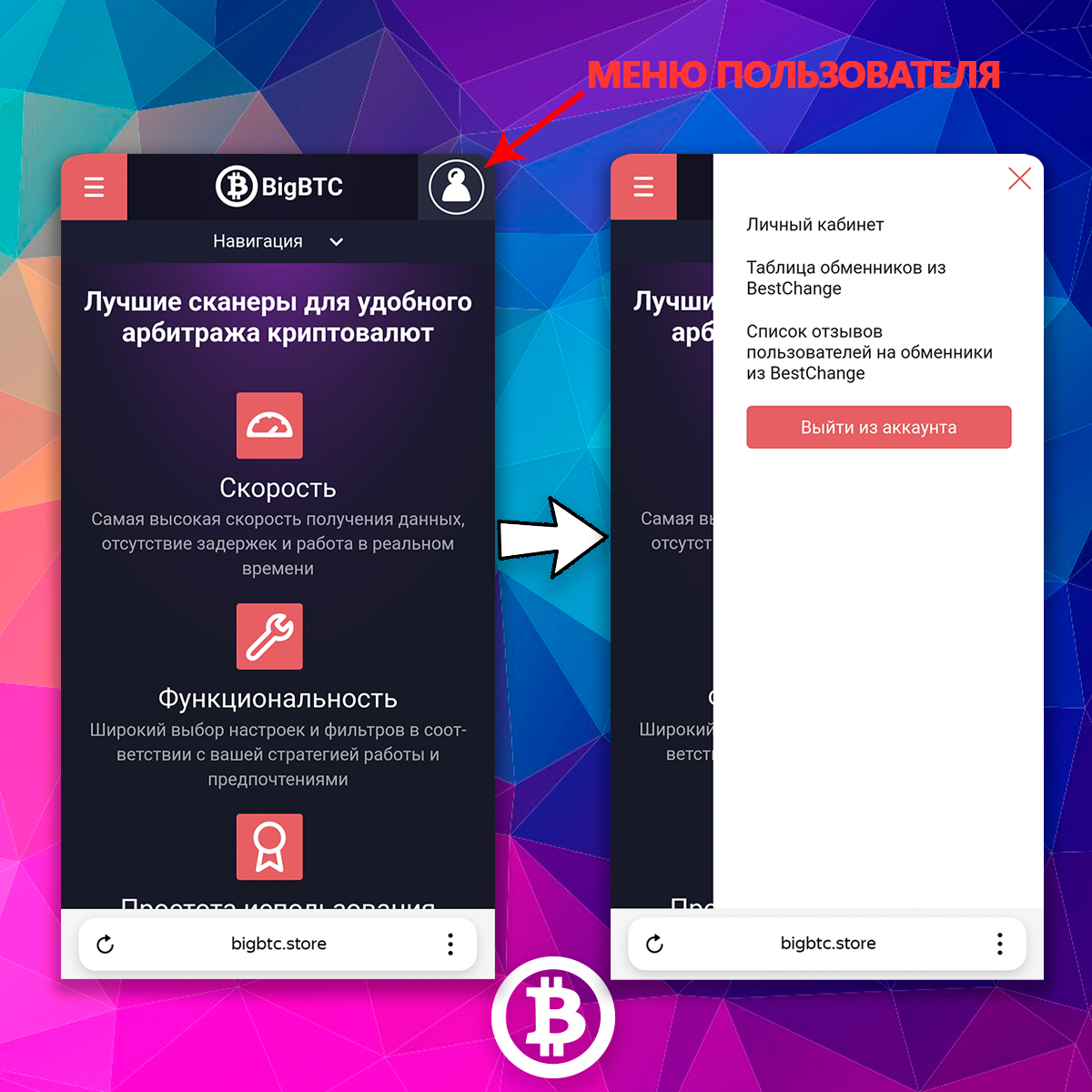
Once you have logged in to the site, click on the button in the upper right corner. Here are links to:
- Your personal user account with information about your current subscriptions and your referral links
- Table of exchangers from BestChange with all information about exchangers
- List of user reviews in chronological order
Exchanger reviews in chronological orderCopy link
You should always be aware of the work of exchangers. Information on exchangers on our website is constantly changing, and exchangers sometimes change their operating rules. New exchangers are appearing.
If you had a break in work, if you do not read our general chat, look at List of user reviews for exchangers from BestChange on our website https://bigbtc.store/bestchange-exchangers-reviews/1. Here we collect all new bot user reviews for exchangers in chronological order. If you have experience with a new exchanger, you will quickly find out about it. If some exchanger has changed its operating rules, you will also be aware
FilteringCopy link
Also, information on exchangers is presented on another of our resources: a closed public in Telegram, we call it Sorting. The information there repeats the information from the table of exchangers with one exception - there are fewer reviews there (all reviews, alas, do not fit into telegram messages)
If for some reason it is convenient for you to find out the operating conditions of exchangers through the telegram interface, use the sorting tool
You will have access to it after purchasing a subscription
Managing your exchanger blacklistCopy link
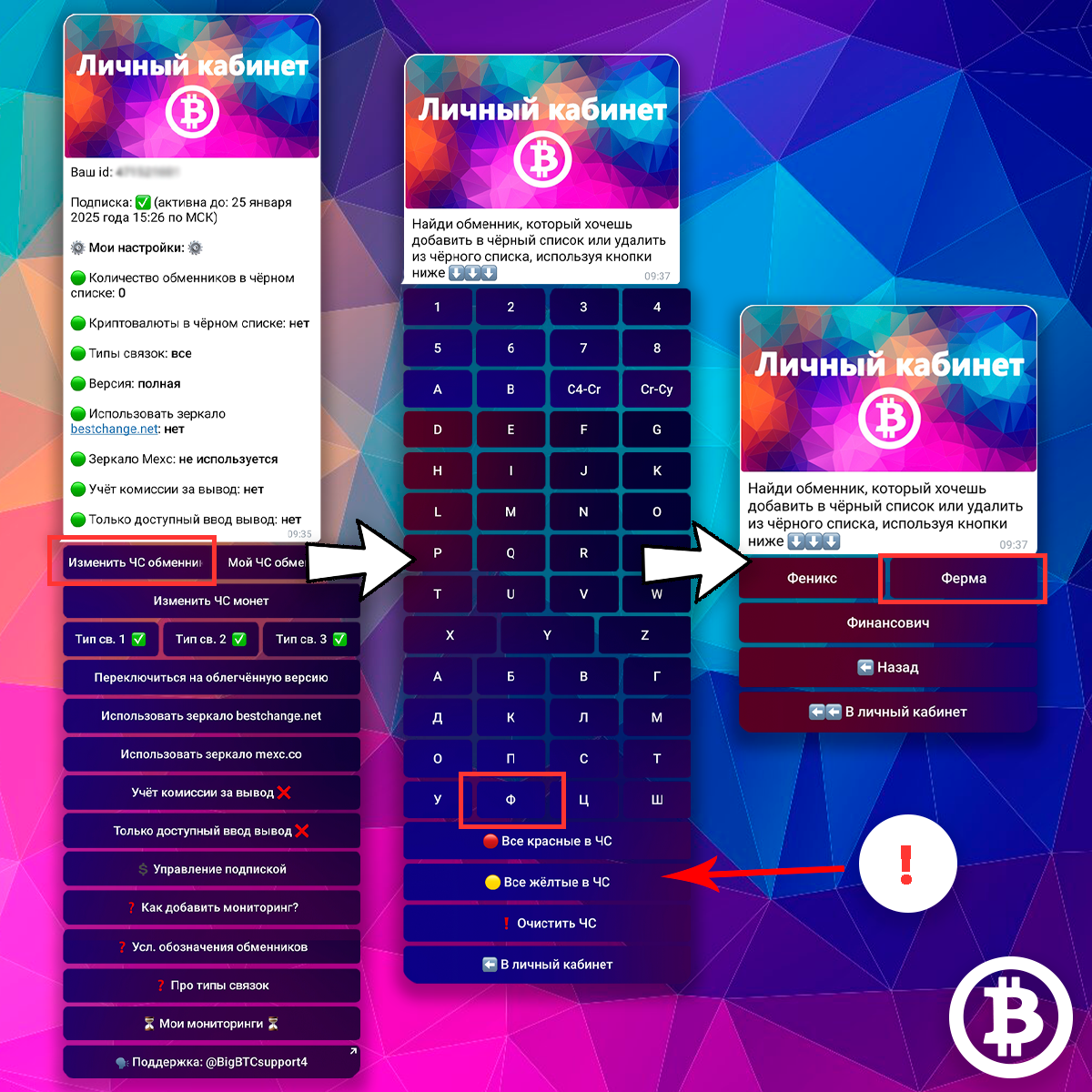
You can add exchangers from BestChange to your blacklist. The bot will not give you links with those exchangers that you have added to the blacklist.
To add an exchanger to the blacklist, click the CHANGE EXCHANGER STATUS button in your personal account. Then use the buttons to find the exchanger that you want to add to the emergency. Click on the name of the exchanger, it will be added to your emergency, you will see a corresponding notification, and a ❌ icon will appear next to the exchanger. Click on the name of the exchanger again - the exchanger will be removed from your emergency, you will see a corresponding notification, the ❌ icon next to the exchanger will disappear
! Using the ALL RED IN BL button you can add all exchangers from the red category to BL at once
! Using the ALL YELLOW IN BL button, you can add all exchangers from the yellow category to BL at once
! The CLEAR BL button completely removes all exchangers from your BL
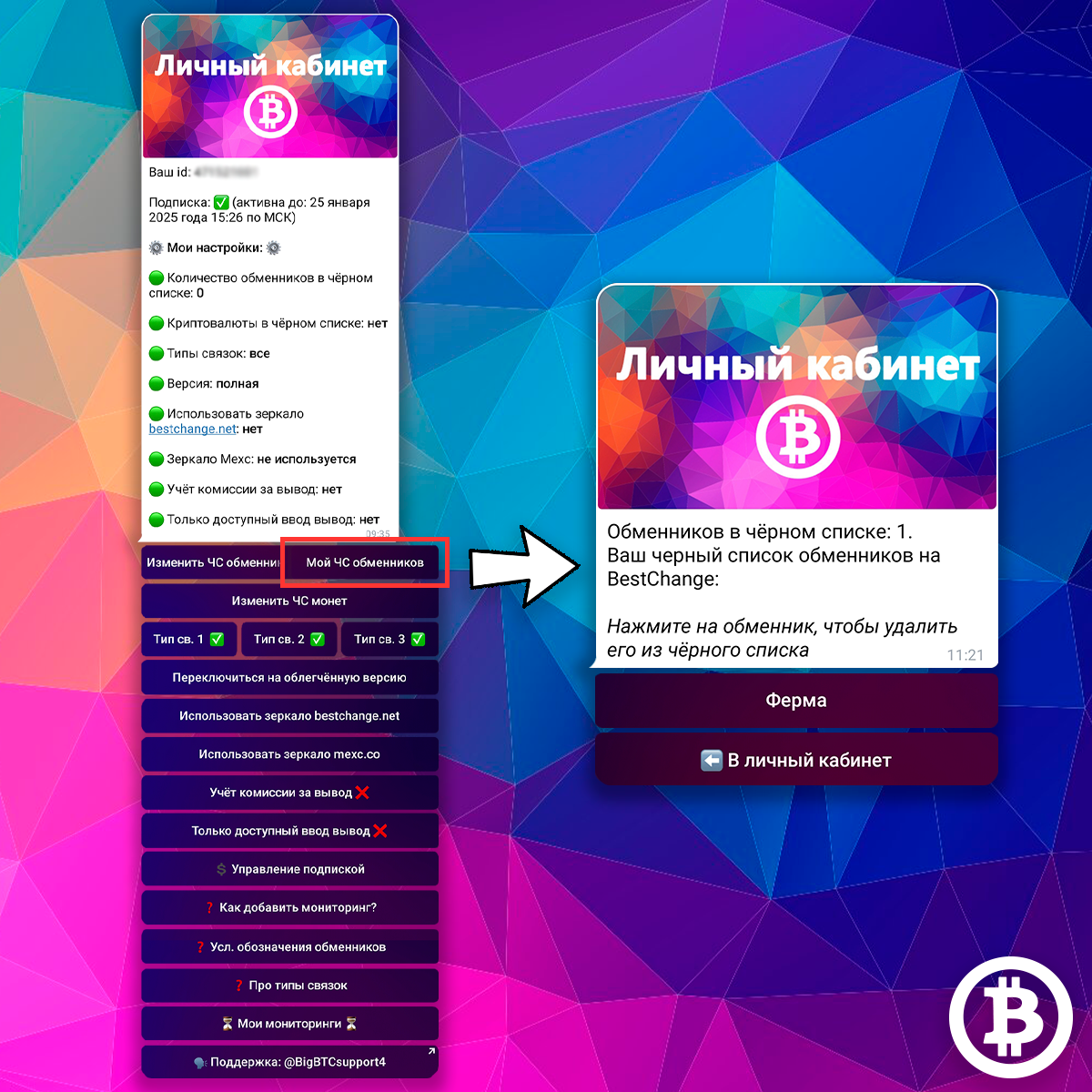
Using the MY Blacklisted Exchangers button in your personal account, you can view your current blacklisted exchangers and remove exchangers from it.
Click on the MY BLACKLISTED EXCHANGERS button, the bot will show you a list of exchangers that are in your emergency
Click on the name of the exchanger, the exchanger will be removed from your blacklist and you will see a corresponding notification
Cryptocurrency blacklistCopy link
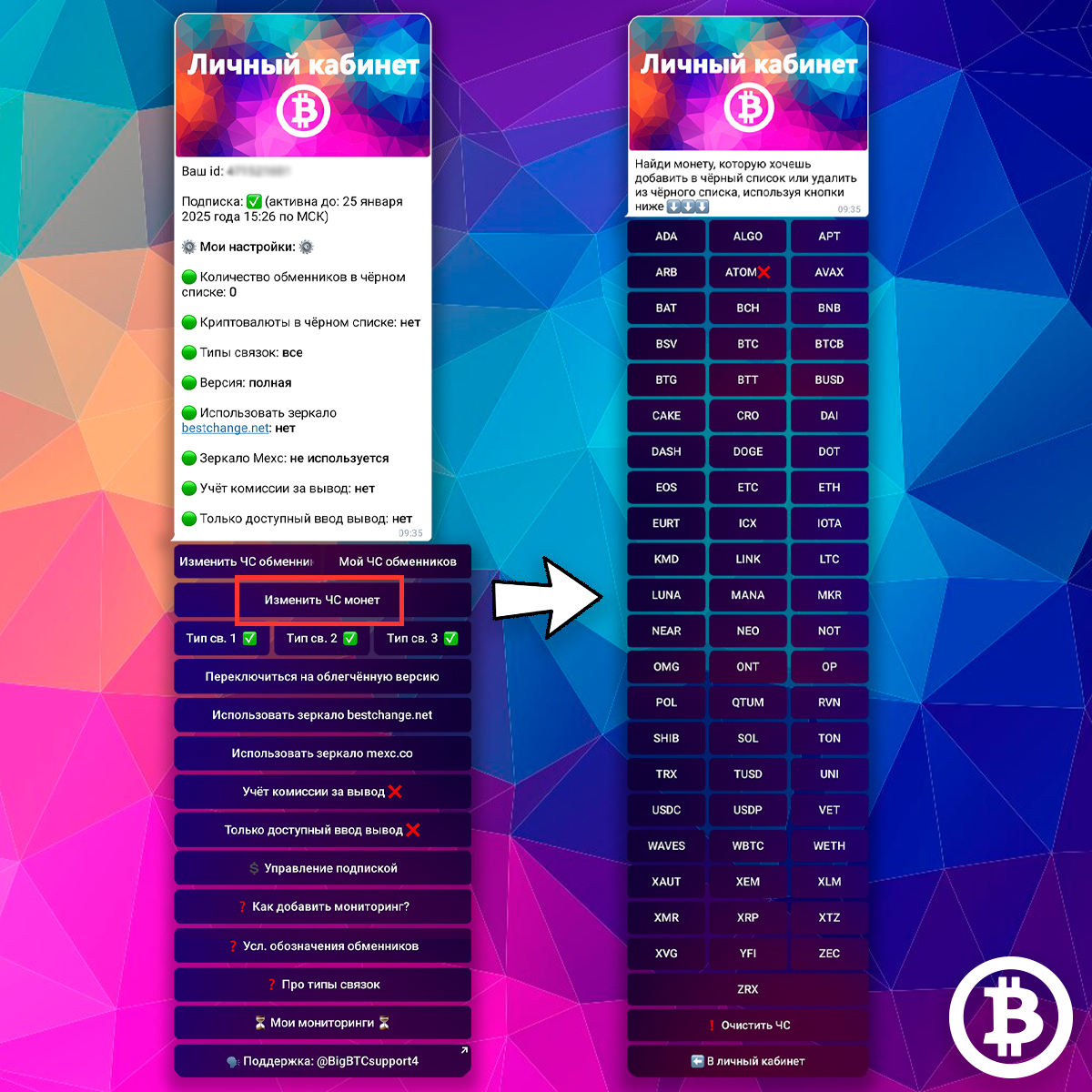
You can add this or that cryptocurrency to your blacklist. The bot will not give you arbitrage opportunities of the cryptocurrencies that you added to the emergency.
Click on the CHANGE COIN BLACKLIST button in your personal account, you will see a list of all coins presented in the bot. Coins that are already in your emergency are marked with a ❌
Click on the name of the coin to change its status: if the coin is already in your BL, it will be removed from the black list; if the coin is not in your blacklist, it will be added to your blacklist. You will see a corresponding notification
Using the CLEAR BL button you can completely remove all coins from your BL
Which cryptocurrencies should be added to the blacklist?
We usually do not add cryptocurrencies to our blacklist. This function is useful if there are currently problems on the exchange with a particular coin, or you want to add a coin to the blacklist if, for example, its network is very long and you do not want to wait a long time for the coin to be deposited/withdrawn to your wallet
Types of arbitrage opportunitiesCopy link
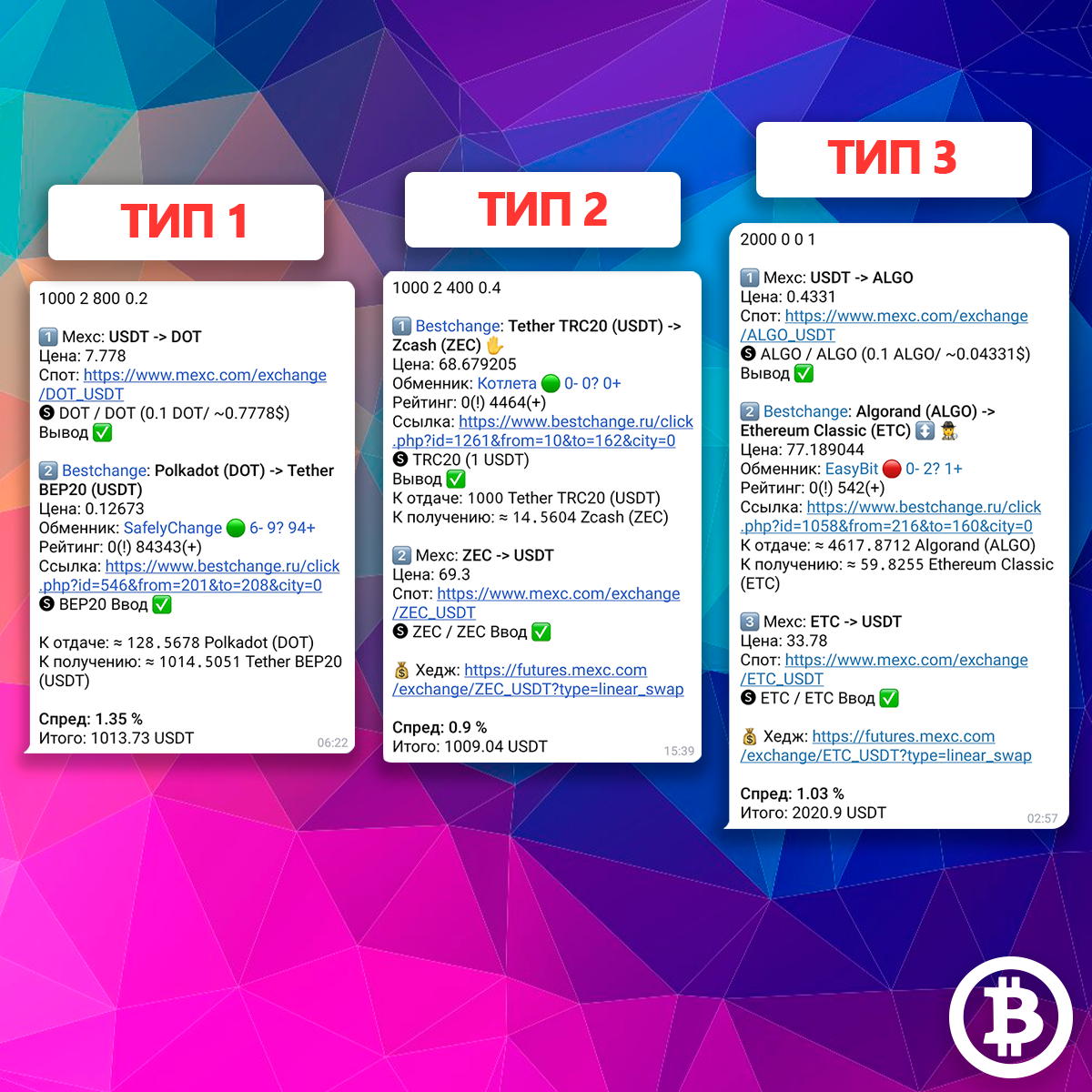
There are three types of arbitrage opportunities
Any arbitrage opportunity begins and ends with a USDT coin
1Consists of two steps
At the first stage, you buy a coin on the exchange for USDT, at the second, you exchange the received coin through the exchanger from BestChange back to USDT. This type of arbitrage opportunities is the simplest: they do not require hedging, and such arbitrage opportunities are very quick to implement
2Consists of two steps
On the first, you exchange USDT through an exchanger for a coin, on the second, you sell the coin on the exchange for USDT. In this type of pairing, it is advisable to hedge the coin that comes to you from the exchanger
3Consists of three steps
On the first, you buy the first coin on the exchange for USDT, on the second, you exchange this coin for the second coin through an exchanger, and then sell this coin on the exchange for USDT. This type of arbitrage opportunity takes the longest to execute and hedging is also desirable here.
More details (with examples of work) about all types of arbitrage opportunities and which of them need to use hedging - in the video:
How to configure arbitrage opportunities types
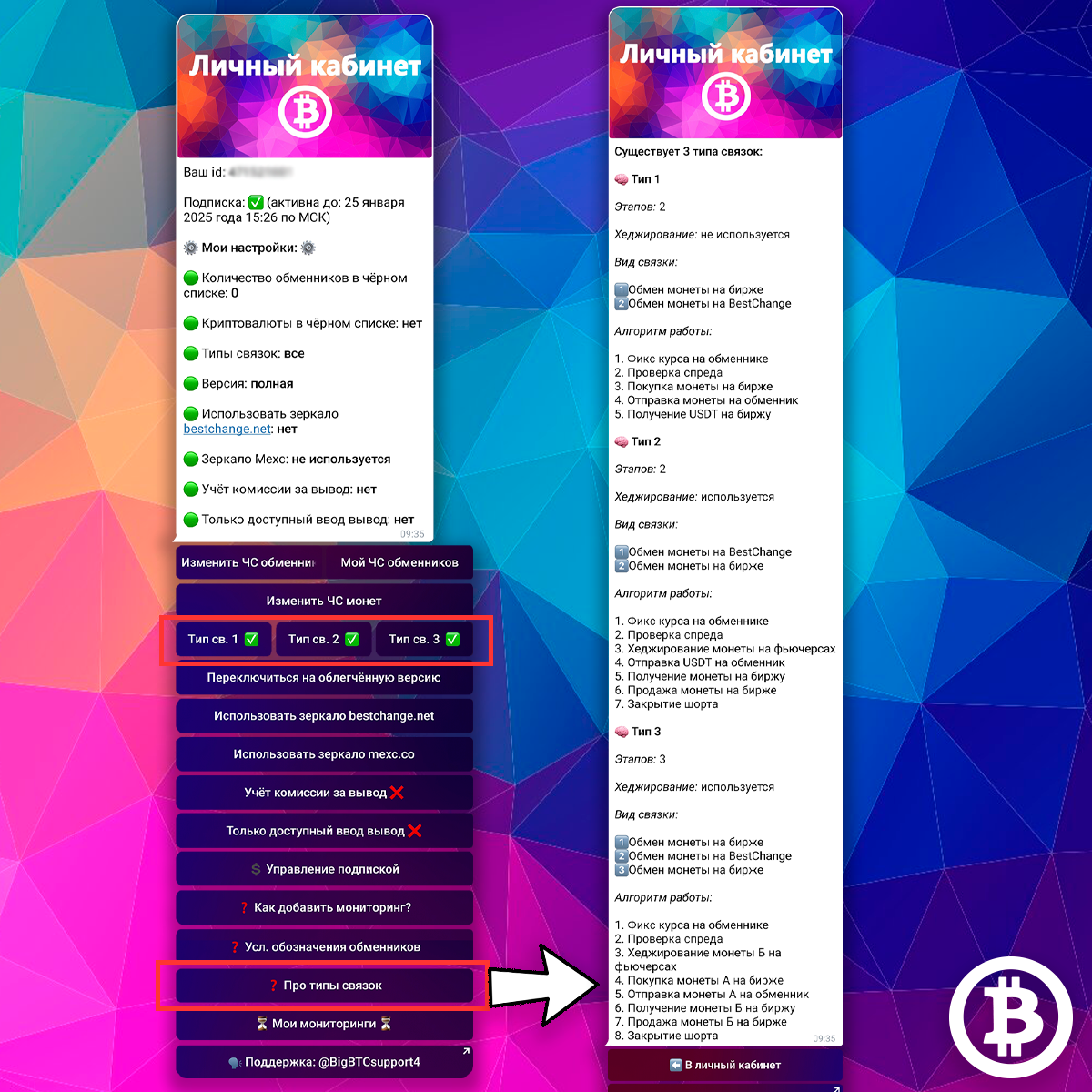
In your personal account you see buttons indicating the types of arbitrage opportunities: TYPE SV 1, TYPE SV 2, and TYPE SV 3. Selected types of arbitrage opportunities are marked with a ✅ sign, you will only receive arbitrage opportunities with the selected types of arbitrage opportunities.
Clicking on the corresponding button changes the setting status. Click on the button with the desired type of link, the icon on the button will change, and you will see a corresponding notification.
There is also a reminder on the types of arbitrage opportunities in your personal account. To see it, click on the button ABOUT TYPES OF arbitrage opportunities.
Arbitrage opportunity versionsCopy link
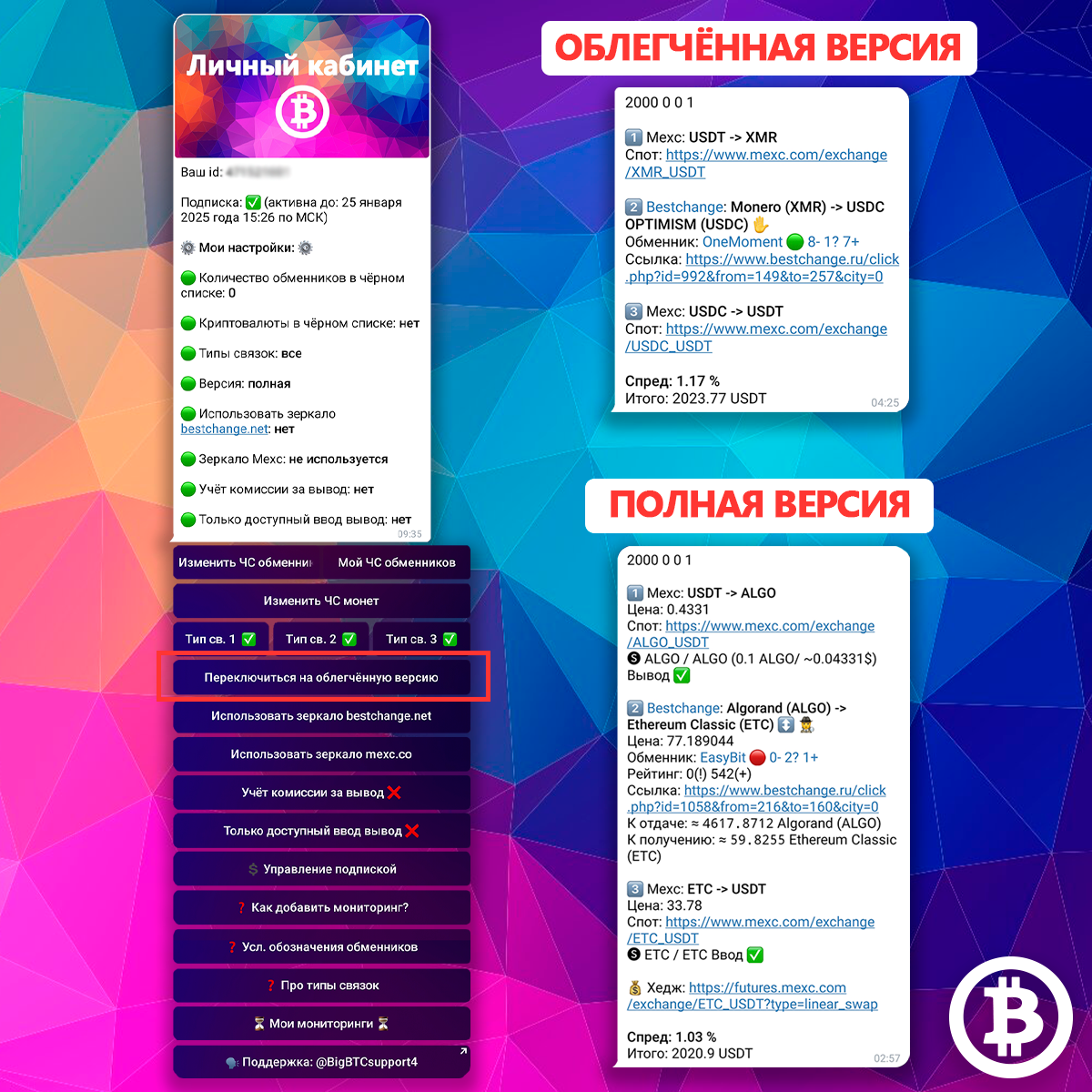
The bot has 2 versions of links: full and lightweight. By default, everyone has the full version of the arbitrage opportunities enabled. You can change the version at any time
1Light version
Suitable for those who work from a phone: arbitrage opportunities in this version do not take up much work space. Also suitable for professionals who do not need any additional information
The light version does not include:
- coin rate (line PRICE)
- network information
- exchanger rating on BestChange
- lines TO GIVE and TO RECEIVE
- link to hedging
2Full version
Includes all possible blocks of information
How to change arbitrage opportunity versions in the bot?
To change the version, use the corresponding button in your personal account. Click on the SWITCH TO LIGHT VERSION button - now you will receive arbitrage opportunities in the light version. If this setting is already applied, you will see a button SWITCH TO FULL VERSION, click on it and, accordingly, you will receive arbitrage opportunities with all possible information
BestChange.net mirrorCopy link
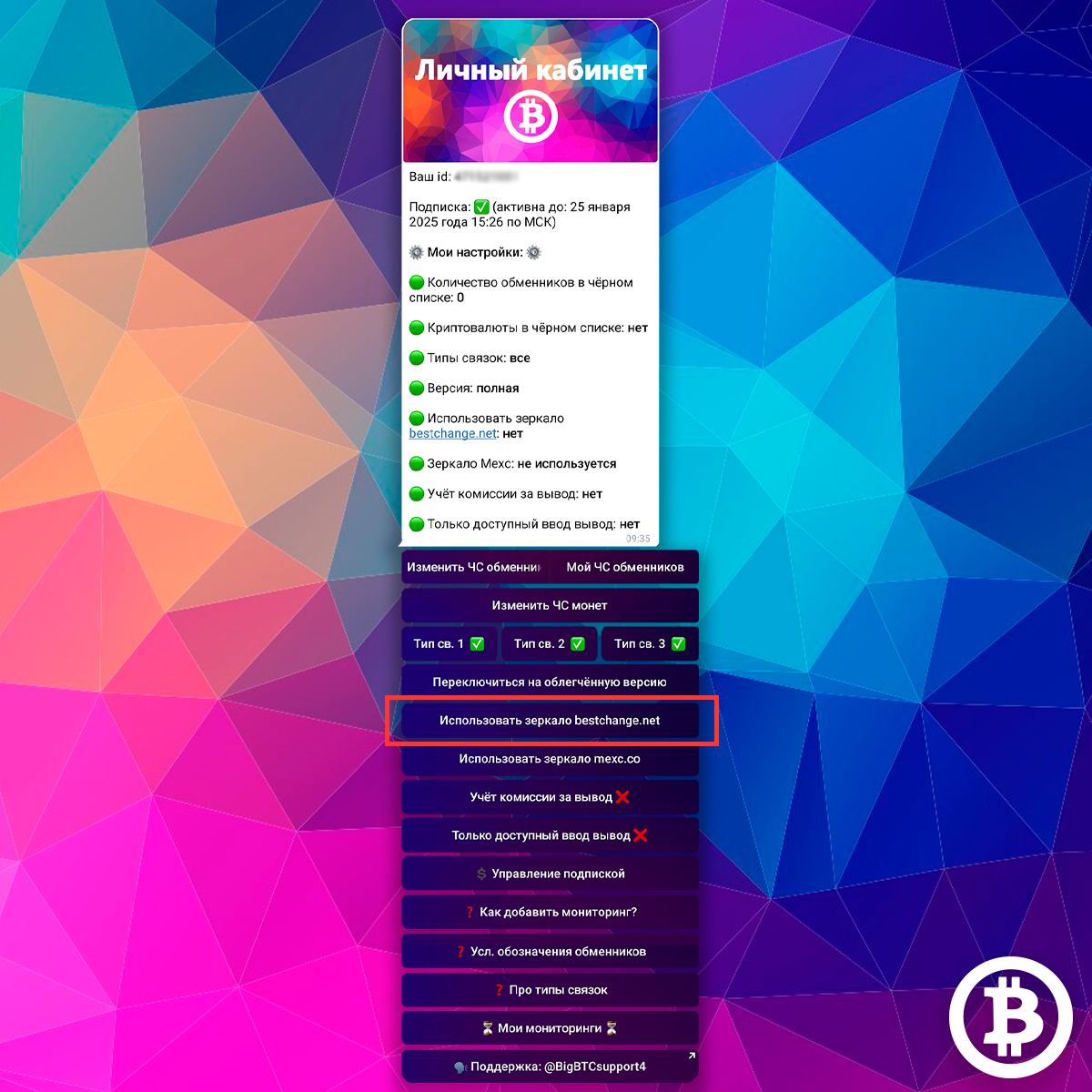
As you know, links to exchangers in the bot are generated by redirection via BestChange for security reasons
Some of our users were having difficulty accessing the main version of BestChange. To overcome this problem, we have added this feature to the bot.
If you have problems navigating to exchanger pages through the main version of the BestChange aggregator, you can activate the use of the BestChange mirror. To do this, click the USE BESTCHANGE.NET MIRROR button in your personal account. Now, in arbitrage opportunities from the bot, all links to exchangers will be generated through the aggregator mirror.
You can disable the use of the mirror in the same way by clicking on the DO NOT USE BESTCHANGE.NET MIRROR button.
Information about the official mirror is here https://t.me/bestchangerus/1241 and on the BestChange website https://www.bestchange.ru/news.html
Exchange mirrorCopy link
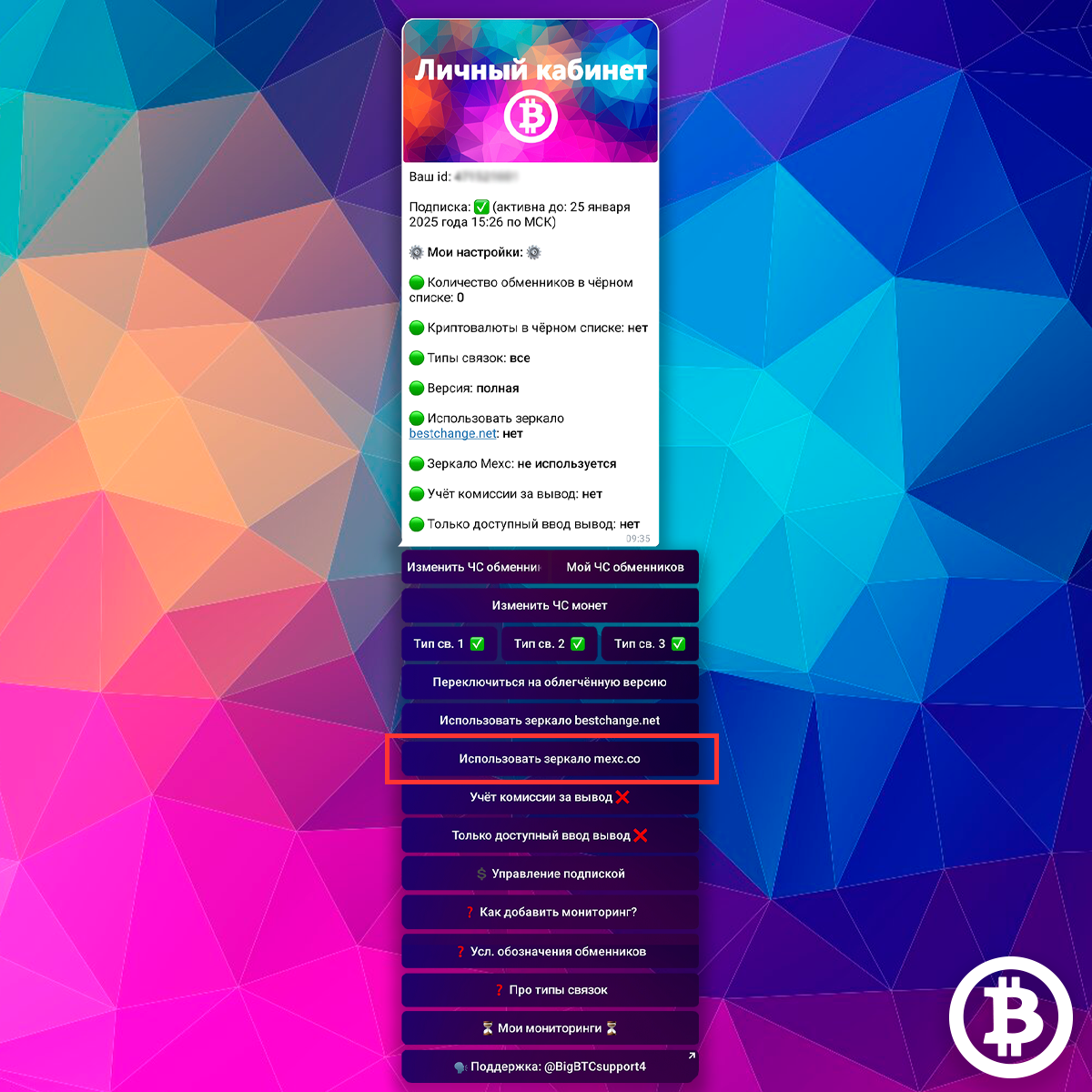
Also, if for some reason you cannot use the main website of the exchange, for example it does not work in your country, you can use the exchange mirror, if a mirror exists. For example, the official mirror of the Mexc exchange is located at mexc.co
Click on the USE MEXC.CO MIRROR button (other bots will have a different link to the official mirror) - the bot will form arbitrage opportunityd links to spot and futures pairs through the mirror.
By default, this function is disabled and the bot generates links through the main version of the exchange
Withdrawal fee calculationCopy link
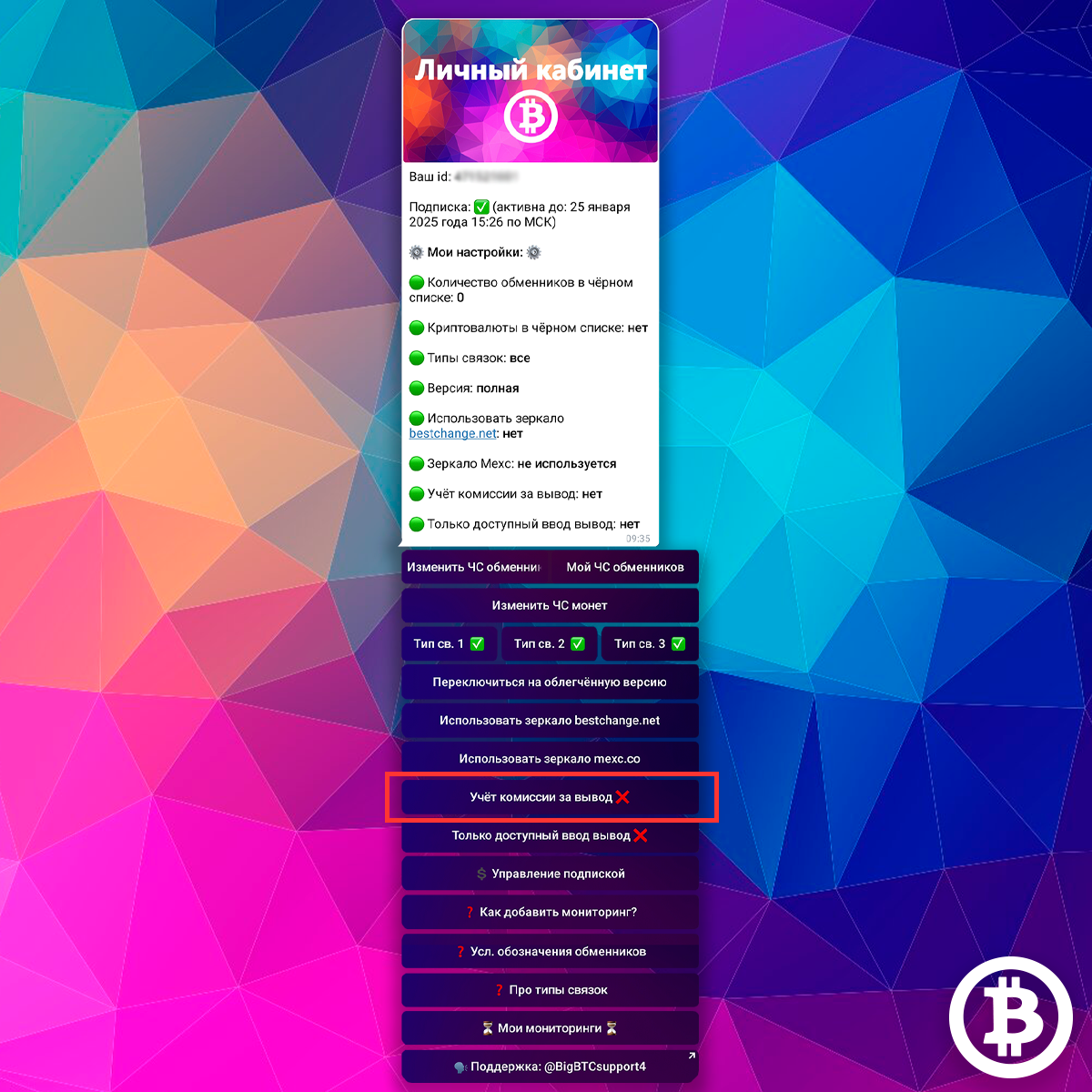
The bot can take into account the current commission for withdrawing coins from the exchange to the exchanger
If commission accounting is turned off, the bot does not take this commission into account in the spread and the total amount; if commission accounting is turned on, the commission is deducted from the spread and the total amount
You see the current commission for network withdrawals in the link in any case, regardless of whether this function is enabled or not
You can turn this function on and off in your personal account using the corresponding button. The ❌ icon on the button means that withdrawal commission accounting is disabled, the ✅ icon means commission accounting is enabled
Only available deposits and withdrawalsCopy link
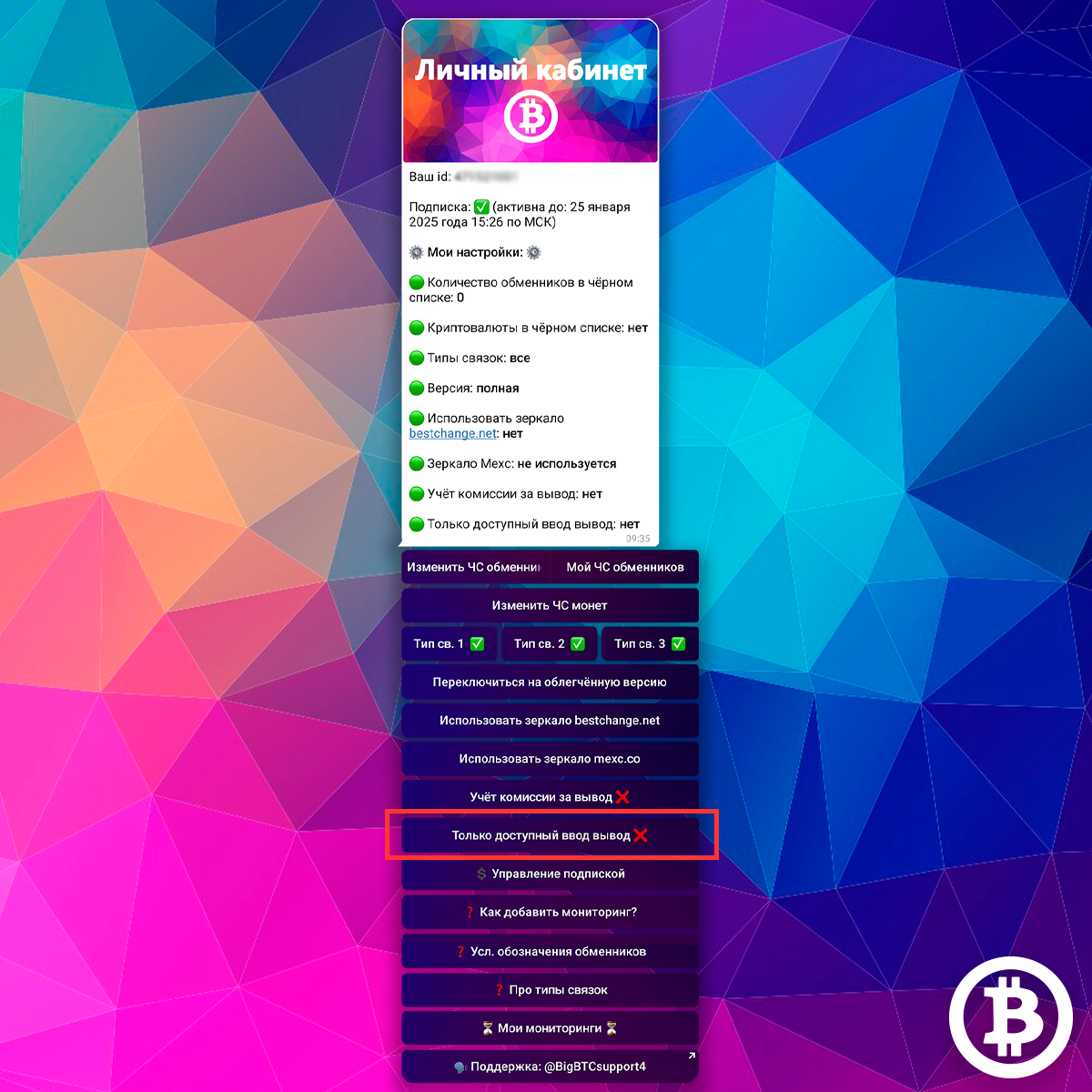
The bot can also check the availability of input and output of coins over the network at the moment; you can see information about the availability of input/output directly in the link
If the ONLY AVAILABLE INPUT OUTPUT function is enabled, you will receive only those arbitrage opportunities in which it is simultaneously possible to withdraw the coin to the exchanger via the required network, and to receive the coin to the exchange via the desired network
You see the network status in conjunction in any case, regardless of the use of the function
You can turn this function on and off in your personal account using the corresponding button. The ❌ icon on the button means that you receive any arbitrage opportunities, the ✅ icon means you only receive arbitrage opportunities with available input and output
When are arbitrage opportunities available?Copy link
There are deals with good spreads when there is volatility in the crypto market. The best spreads occur when the market is going up or down, and when exchange users are actively trading. On exchangers, rates do not change immediately, the bot’s algorithm catches exactly this
How often are arbitrage opportunities available?
Every day is different. One day there may not be anything particularly worthwhile, but on another day the arbitrage opportunities will fall one after another. As already said: everything depends on market volatility.
We collect our statistics on working with arbitrage opportunities from the bot here: https://bigbtc.store/statistics
Here are the statistics for October, the net result was +67.46% of the deposit: https://bigbtc.store/statistics/october-2022
Please note that there were not deals with a decent spread every day. This is normal and does not interfere with earning money. Work in this type of arbitration begins when arbitrage opportunities appear, not vice versa
What is monitoring?Copy link
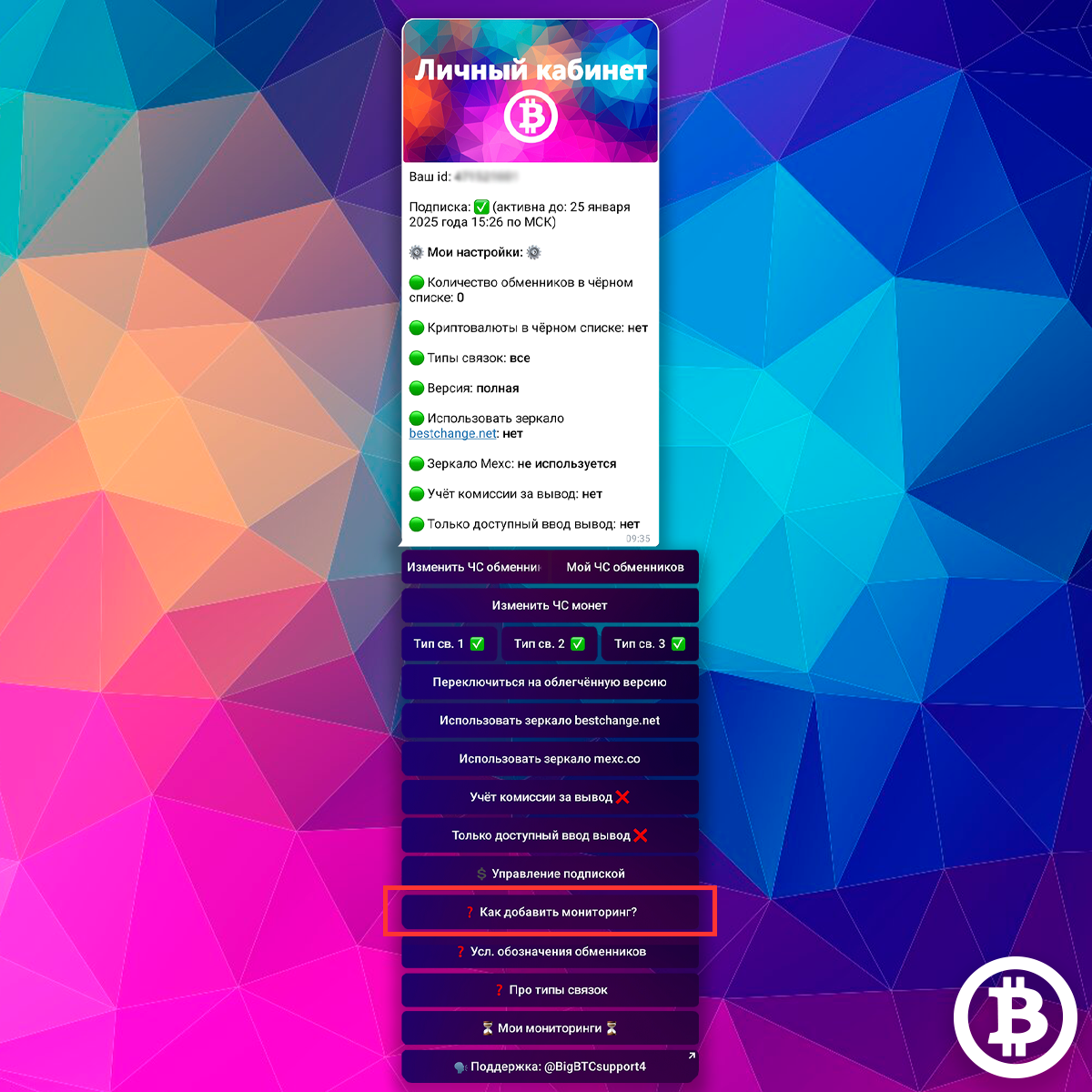
The monitoring function is the most IMPORTANT function of the bot
As mentioned above, there may not always be arbitrage opportunities that suit your settings. Arbitrage opportunities can appear at any time and you need to work on them immediately; work in this type of arbitrage begins when there are arbitrage opportunities on the market. To receive notifications from the bot when links appear, you need to enable monitoring
Monitoring searches for links according to your settings for a set time and sends you links to the bot with a notification when the required links are found
A reminder on how to install monitoring is in your personal account: button HOW TO ADD MONITORING
How to add monitoring?Copy link

To add monitoring, send one message to the bot. In your message, please separate the following:
1USDT quantity
The USDT quantity is the amount of USDT you plan to work with. The bot algorithm needs this information to take it into account when searching for arbitrage opportunities with exchangers for you.
Each exchanger has a minimum amount that he is willing to work with and a maximum amount that he is willing to exchange. The bot will show you arbitrage opportunities only with those exchangers whose limits include your amount
For example, your amount is 2000 USDT. If this amount is more than the minimum and less than the maximum limit of the exchanger, you will see a link with this exchanger. That is, for example, a particular exchanger has a minimum limit of 100 USDT, a maximum of 10,000, which means that a link with this exchanger will be shown to you by a bot. If, for example, the minimum amount that the exchanger is willing to work with is 5000 USDT, then you will not see a link with this exchanger
2Maximum number of open claims on the BestChange exchanger
An open claim against an exchanger on BestChange is marked in red.
The exchanger tries to close any claim as soon as possible and resolve the problem. As soon as the complaint is resolved, it will change to resolved status, it will be highlighted in gray on BestChange, such a review on BestChange is no longer considered negative.
An open complaint (or even more so several) may indicate problems with the exchanger at the moment. For example, the exchanger has delays in the exchange - users of the exchanger will open claims on BestChange due to these delays in the exchange. As soon as the problem of the exchanger is resolved, these claims will be resolved.
We recommend specifying the number 0, 1 or 2 for this setting
3Minimum number of POSITIVE reviews for the exchanger from BestChange
The more positive reviews an exchanger has, the longer it works, the more popular it is, and the more verified it is. Here we recommend specifying a number from 200, preferably from 500.
4Minimum spread
Here indicate the minimum spread you are willing to work with. The bot will show you all the deals that have a spread equal to or greater than the specified minimum. Arbitrage opportunities with a spread less than the minimum will not be shown to you.
Remember: the larger the amount you are working with, the smaller the spread you can afford. For example, if your starting amount is 500 USDT, then your minimum spread must be more than 1%, otherwise all your income will be eaten up by commissions. And if your amount is, for example, 4000 USDT, then you can already try working with a spread of 0.2%
So, send the bot a message with the data as in the picture. In this case, we indicate that we will work with the amount - 2000, we are interested in arbitrage opportunities with exchangers that have a maximum of 0 open claims and a minimum of 500 positive reviews on the aggregator, the minimum spread we are interested in is 0.8%
After you send a message to the bot, it will offer you to start monitoring for 3, 6, 8 or 12 hours, or just save the monitoring in the bot’s memory. Select the one you need. You will receive a notification and you will see a list of your monitoring
You can save up to 10 monitorings simultaneously in the bot’s memory
Each monitoring works independently of each other according to the specified settings
All other basic settings from your personal account (such as blacklists of exchangers and coins, commission accounting, etc.) are applied to all your monitoring immediately after they are applied
Monitoring managementCopy link
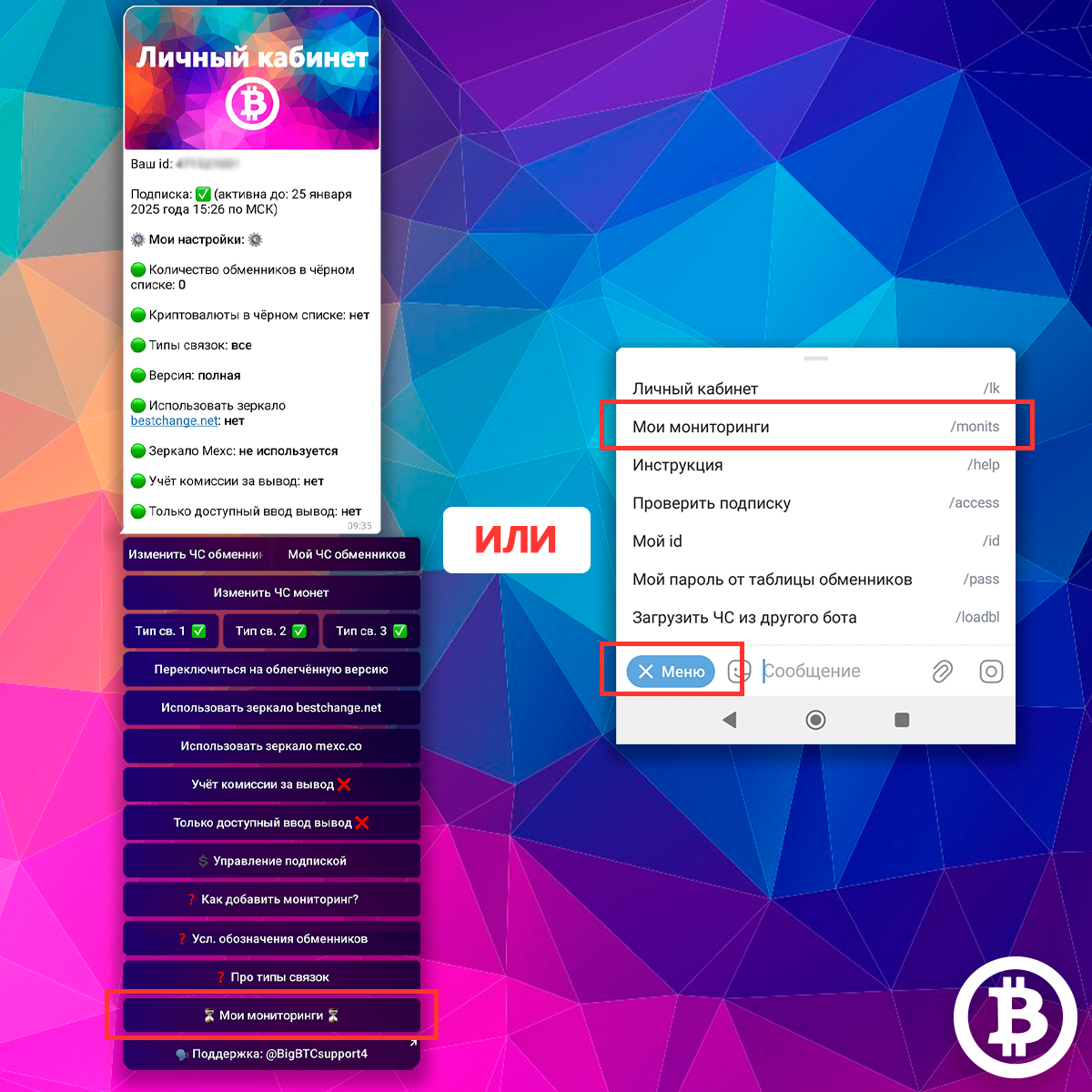
To get into monitoring management, you can
Option 1: click on the MY MONITORINGS button in your personal account
Option 2: click on the MY MONITORINGS button in the main menu of the bot
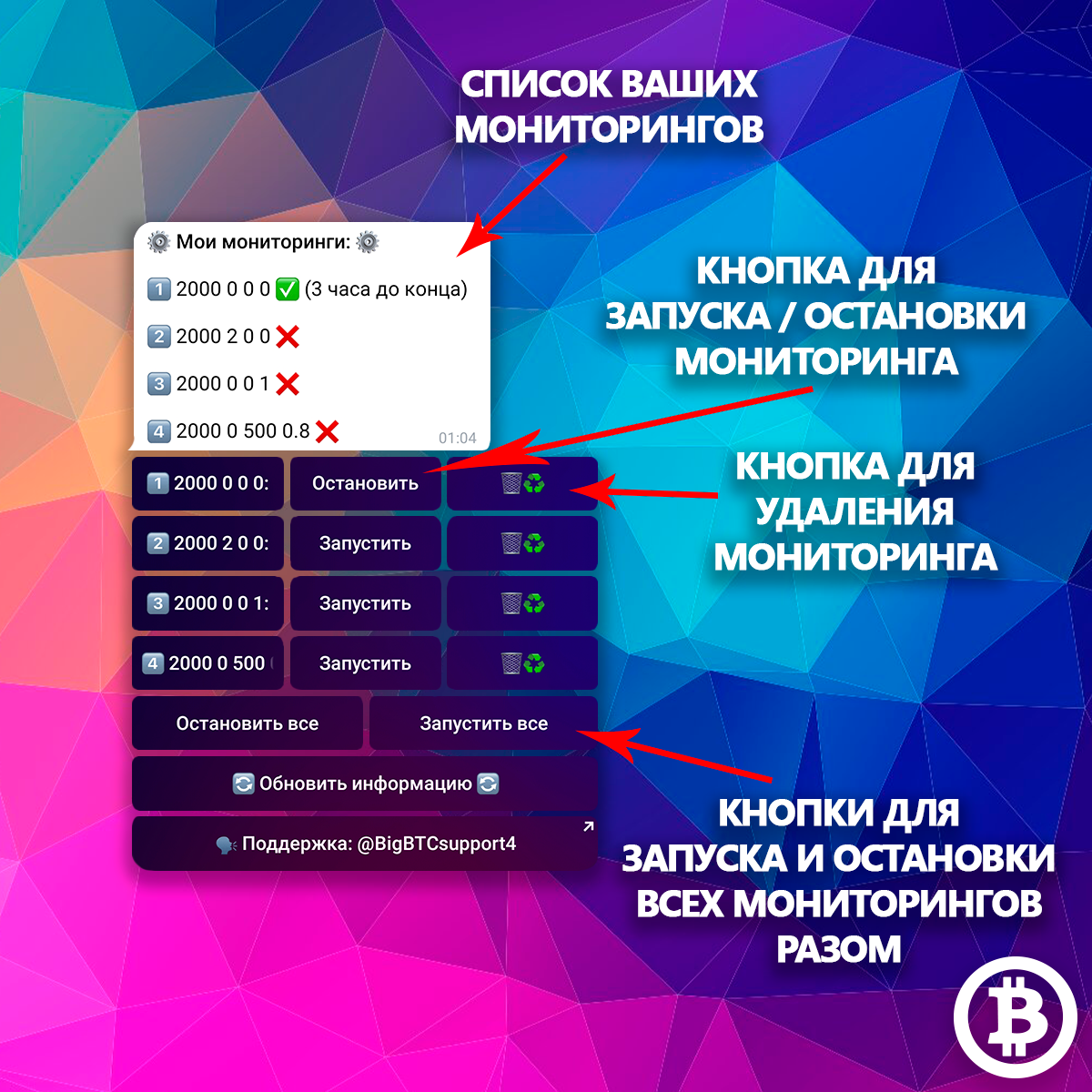
This is what information about your monitoring looks like
Your saved monitorings are numbered, and monitoring data is indicated next to them. In the message, monitoring systems that are currently running are marked with a ✅ sign and the time until the end of monitoring is indicated next to it; monitoring that is not running is marked with a sign ❌
You can start any monitoring using the RUN button next to the monitoring, or stop it using the STOP button
You can delete monitoring from the bot’s memory using the button with the image of a trash can. If the monitoring being deleted is running, it also stops working when removed from
Also, with one button you can stop or start all monitoring at once
When links are found, running monitoring does NOT stop, it runs for the entire set time
One-time searchCopy link
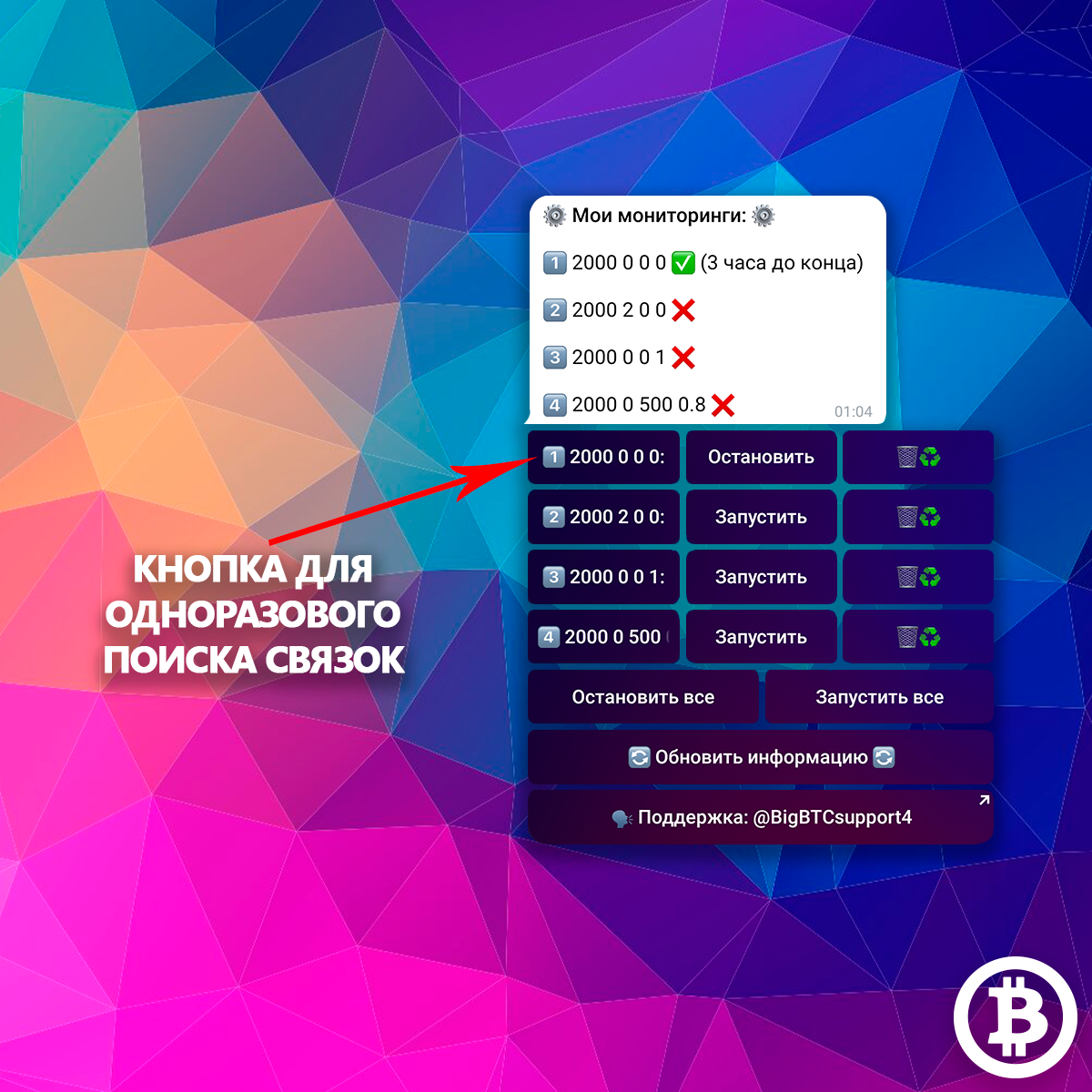
You can also run a one-time search for links
A one-time search is not monitoring. A one-time search by clicking a button shows you up to 10 of the most profitable deals that currently exist. In this case, a one-time search does not take into account the minimum spread you set, but takes into account the working amount and the number of negative and positive reviews on exchangers
To start a one-time search for combinations, click on the button with the settings you are interested in in monitoring management - the bot will send you up to 10 of the most profitable combinations in descending spread order
Load a blacklist of exchangers from another botCopy link
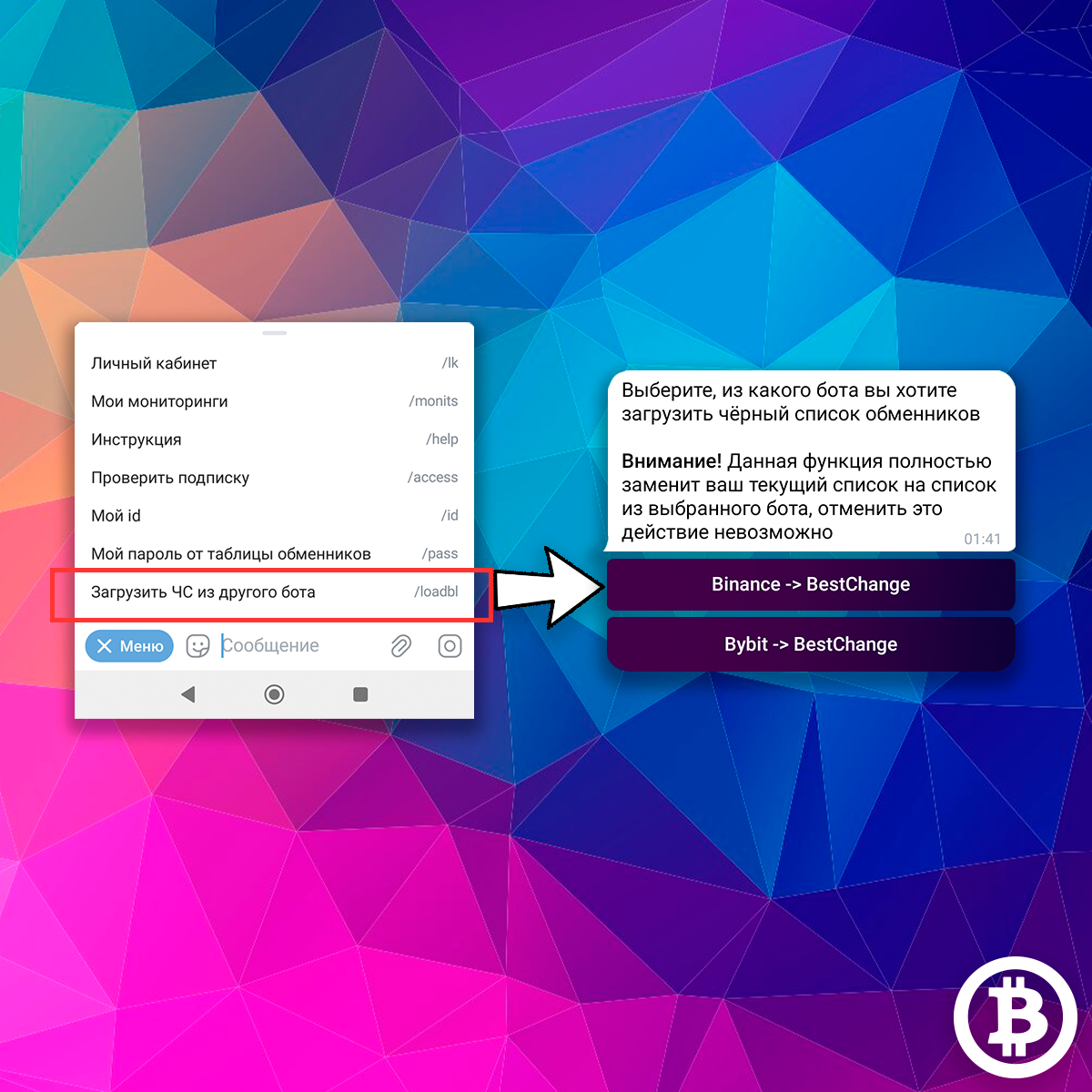
For ease of use, bots for working with different exchanges are different bots. Moreover, during the subscription period, you can switch between bots with different exchanges at any time (just write to technical support)
So that when moving between different bots you do not have to refill your blacklist of exchangers each time, you can transfer your blacklists from other bots
To transfer a blacklist from another bot to the current one, click on the LOAD ORIGINAL BL FROM ANOTHER BOT button in the bot’s main menu. Then select from which exchange bot you want to transfer the emergency. Your blacklist will be downloaded, you will see a corresponding notification
All your settings, including blacklists, are always saved to you after your subscription expires. Therefore, if you take a break from working with the bot, you will not need to create your blacklist again, no matter how long the break is :)
How much can you earn?Copy link
Our bots are not an employer with a salary. We don’t know exactly how much you will earn.
Your earnings depend on:
- Your knowledge and willingness to learn
- Your deposit - the higher it is, the more arbitrage opportunities you have
- Crypto market volatility
We show and tell you how to use bots, how to hedge, which exchangers you should work with, etc. On our channel you will find many training videos, we post a large number of guides in the news public and in DMs to users. We also provide assistance via PM and chat, within reason, of course.
We show our examples of work using arbitrage opportunities of bots with a full monthly report and all screenshots.
We also collect some user reviews with links to the chat in our channel https://t.me/BigBTCchannel under the hashtag #reviews. The guys share their successes, some show how much they work with, you can learn from their experience regarding your deposit
Will the final spread in the arbitrage opportunity be exactly the same as in the bot?Copy link
Despite the fact that all calculations of the algorithm are strictly mathematical and cannot be approximate, at the moment when you see the spread, it already becomes approximate. The spread you get after using the arbitrage opportunity may be less or more. Consider arbitrage opportunities from the bot as a trend: the rate may fall further or rise further from the moment you receive the arbitrage opportunity (check the arbitrage opportunity while you enter wallets, etc.)
Let's say you received a arbitrage opportunity with a spread of 1.5%. This means that at the time of collecting and analyzing information, the algorithm saw a arbitrage opportunity with such a spread among 55 thousand pairs. You have checked everything: the arbitrage opportunity is still working. After using the arbitrage opportunity, your spread could be 1 or 2 percent. Reason: volatility in the market.
Is it important what starting amount of USDT I specify in the settings? Will the number of profitable deals the bot give me change if I specify a larger amount?Copy link
Answer: definitely yes.
All the data you provide in the settings is important. The larger your starting amount, the more the algorithm will find profitable deals for you.
This is explained by the minimum amounts that exchangers from BestChange are willing to work with. There are more than 500 exchangers on the aggregator, and among them there are many that work with fairly large minimum amounts: it’s more profitable for them. And often they have the best courses. The larger your starting amount, the better the rate will be for you, and the more exchangers there will be that suit your conditions. The larger the starting amount, the more arbitrage opportunities you will have with a good spread.
Important!Copy link

Each opportunity that the bot gives you must be checked for relevance. There are arbitrage opportunities whose lifetime is a few seconds, some live, for example, half an hour or an hour.
Our algorithm analyzes about 50 currency pairs in different variations and in several moves (this is approximately 55 thousand pairs) and finds among them those pairs that have a positive spread at the time of collecting information.
We immediately warn you: there are arbitrage opportunities that are so fleeting, occurring due to a sharp one time jump in the rate of a particular coin, that by the time you see it and check it, it will simply evaporate. But there are arbitrage opportunities that live longer.
We cannot predict which pairing will turn out to be which, because for this we need, perhaps, to look into the future :)
Our rulesCopy link
Full rules here https://t.me/BigBTCchat/89261
Chat rules https://t.me/BigBTCchat
- Spam, advertising, insults, swearing, offers to buy/sell arbitrage opportunities are prohibited
- You cannot post valid links (you can only use a screenshot)
- If you want to check any site that is not associated with the BestChange aggregator and our bot, post it here https://t.me/BigBTCSearchScam
We reserve the right to refuse to purchase a subscription without giving reasons.
Communication with admins
Any manifestation:
- aggression
- blackmail
- inappropriate behavior
will lead to a permanent ban and blacklisting of the chat.
Any attempts/threats to interfere with the work of the bot, intentionally harm the work of the bot, attempts/threats to intentionally discredit the bot, attempts/threats to harm the work of the chat or any other resource, attempts to resell arbitrage opportunities from the bot will lead to a complete blocking of your account and immediate termination of the subscription
Subscription costCopy link
Bot Binance - BestChange: https://t.me/cryptocurrency_arbitrage_bot
Bot ByBit - BestChange: https://t.me/arbitrage_bybit_bot
Bot Mexc - BestChange: https://t.me/arbitrage_mexc_bot
Cost of subscription to any of the bots:
- 1 week = 25 USDT
- 2 weeks = 45 USDT
- 1 month = 65 USDT
- 3 months = 150 USDT
- 6 months = 250 USDT
- 1 year = 450 USDT
- perpetual = 800 USDT
When you subscribe to two bots at the same time, you get a 25% discount on the total amount ⭐️
Cost of subscription for 2 bots including discount:
- 1 week = 37 USDT
- 2 weeks = 67 USDT
- 1 month = 97 USDT
- 3 months = 225 USDT
- 6 months = 375 USDT
- 1 year = 675 USDT
- perpetual = 1200 USDT
How to buy a subscription?
To purchase a subscription, write to bot support using the link from the bot